# Playwright Parallelization

Running Playwright tests in parallel is most popular technique for speeding up end-to-end tests in CI. Playwright is highly concurrent — you can run multiple tests in parallel by:

* splitting tests between multiple machines (sharding)
* running multiple tests in parallel on the same machine using [playwright worker processes](https://playwright.dev/docs/test-parallel#worker-processes)

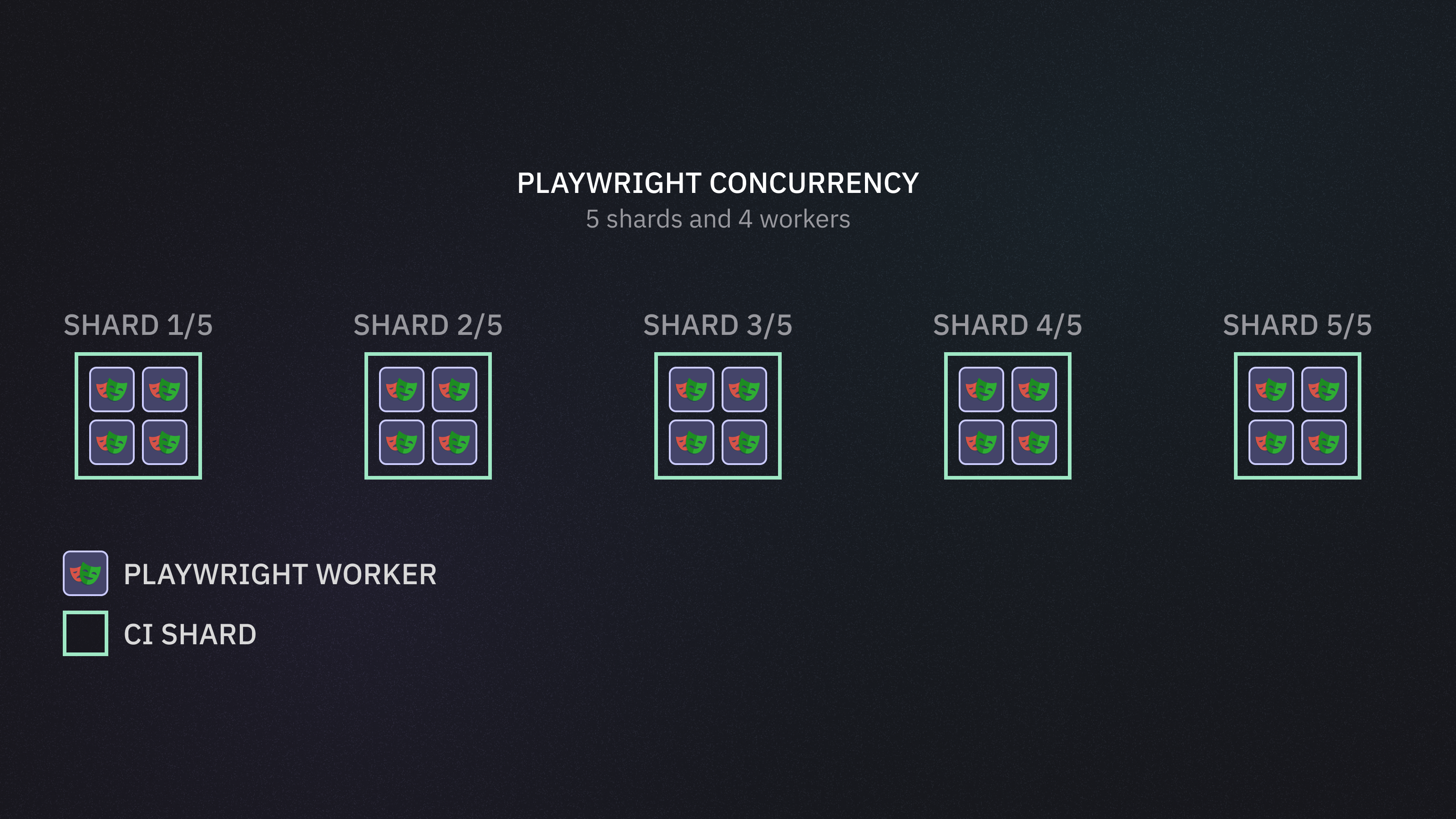
<figure><img src="https://3745692499-files.gitbook.io/~/files/v0/b/gitbook-x-prod.appspot.com/o/spaces%2FqmFDEiUa9mr11LUlxDnt%2Fuploads%2FjSf6rGvI1VW8cmzZhmCI%2Fplaywright%20concurrency.png?alt=media&#x26;token=ba3d61b9-add8-4bab-a63e-b188a0cde21d" alt=""><figcaption><p>Playwright concurrency example - 5 shard with 4 workers each allows parallel execution of 20 tests</p></figcaption></figure>

In the example above, the overall "bandwidth" is 20 concurrent tests — 5 shards with 4 workers each. Consider setting the number of workers according to the CI resource class, and also consider enabling [fully-parallel-mode](https://docs.currents.dev/guides/ci-optimization/fully-parallel-mode "mention").

In addition to using multiple workers, we will explore the parallelization methods:

* Playwright Sharding
* Currents Orchestration

## Playwright Sharding

Playwright has a built-in support of [Sharding](https://playwright.dev/docs/test-sharding) — given the overall amount of machines and the current shard index, only a subset of tests runs on each CI machine.

```bash
npx playwright test --shard 1/2 # current shard = 1; overall shards = 2.
```

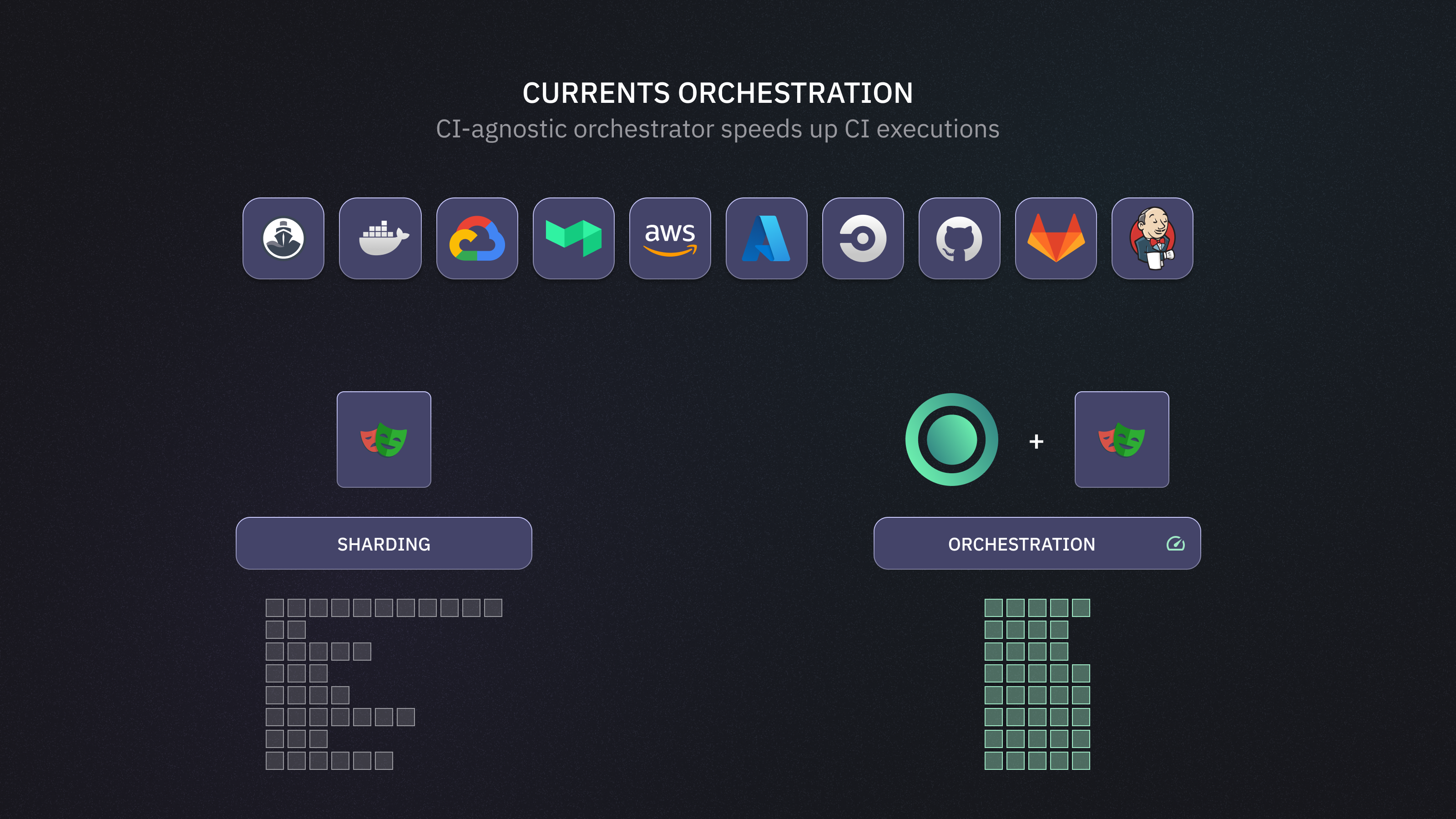
<figure><img src="https://3745692499-files.gitbook.io/~/files/v0/b/gitbook-x-prod.appspot.com/o/spaces%2FqmFDEiUa9mr11LUlxDnt%2Fuploads%2FyoSk8DKcZeG0Nc2kixy6%2Fplaywright-sharding-example.png?alt=media&#x26;token=9a5c7c50-6018-46ad-8770-74cf4c34e9b1" alt=""><figcaption><p>Example of running 12 test files on 5 CI machines in parallel using Playwright Sharding</p></figcaption></figure>

The example above demonstrates running 12 test files on 5 CI machines. Each shard only runs a subset of tests, which is faster than running all the tests on a single machine.

The overall CI job duration is determined by the slowest (busiest) shard. There are multiple factors that affect its duration:

* Playwright configuration
  * number of workers
  * [fully-parallel-mode](https://docs.currents.dev/guides/ci-optimization/fully-parallel-mode "mention")
* Optimal splitting of tests between the shards

{% hint style="info" %}
**Load Balancing**

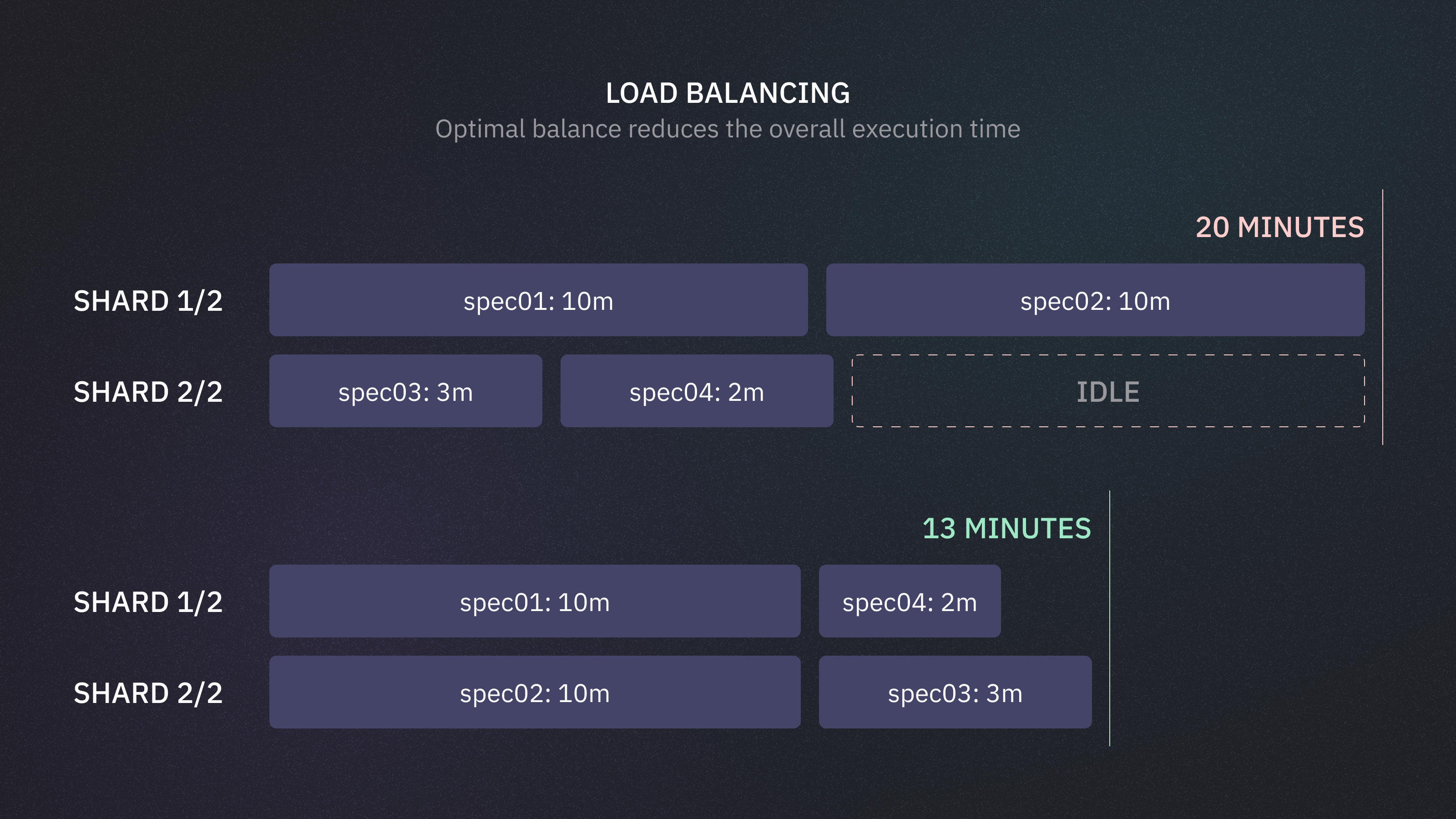
Optimally splitting tests between shards can significantly affect the CI execution time. Sharding splits test files based on the lexical order of test file paths — it often leads to unbalanced workloads.

Take, for example, a testing suite consisting of 4 test files with the following durations:

* `spec01`: 10 minutes
* `spec02`: 10 minutes
* `spec03`: 3 minutes
* `spec04`: 2 minutes

  <figure><img src="https://3745692499-files.gitbook.io/~/files/v0/b/gitbook-x-prod.appspot.com/o/spaces%2FqmFDEiUa9mr11LUlxDnt%2Fuploads%2FCAQLAWAGeDnTYYiH0cqj%2Fload-balancing-shards.png?alt=media&#x26;token=17d0f53d-b6a8-4d8e-873f-b287d21936b8" alt=""><figcaption><p>Sharding splits the files inefficiently (20 minutes vs 13 minutes).</p></figcaption></figure>

With 2 machines, sharding splits the files inefficiently (20 minutes vs 13 minutes).
* Shard 1: `spec01`, `spec02` (20 minutes total)
* Shard 2: `spec03`, `spec04` (5 minutes total)
  {% endhint %}

## Playwright Orchestration

{% hint style="success" %}
**Orchestration for Playwright** is included with your Currents subscription.

* ✅ Integrate with any CI provider and run tests on your own infrastructure
* ✅ Speeds up your CI pipeline by analyzing your test suite and intelligently distributing tests across available CI runners
* ✅ Minimizes total runtime and maximizes resource utilization, eliminating custom scripts and reducing manual maintenance
  {% endhint %}

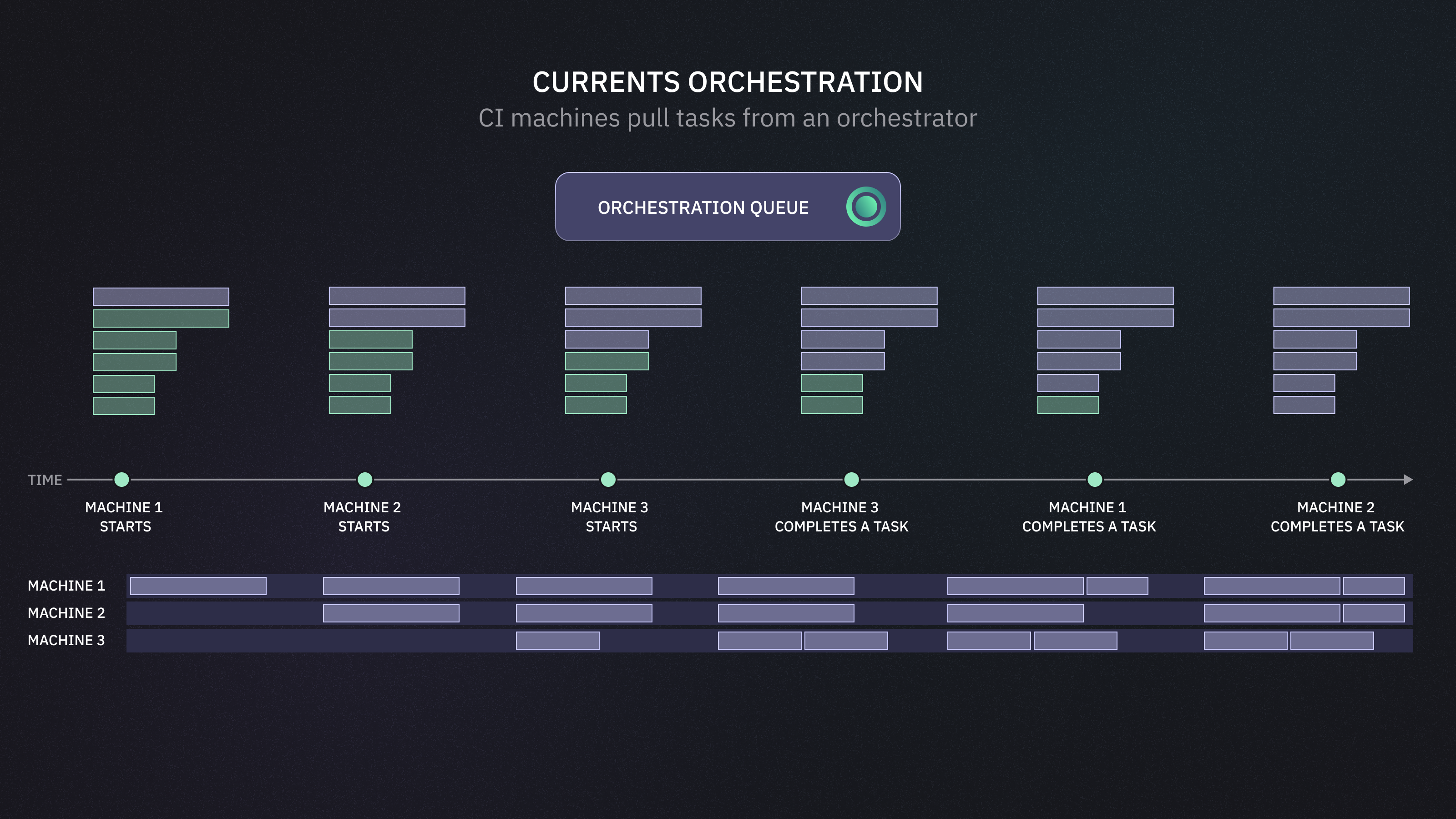
An alternative approach to sharding is **orchestration** — using an external service that instructs each machine what tests to run in real time.

<figure><img src="https://3745692499-files.gitbook.io/~/files/v0/b/gitbook-x-prod.appspot.com/o/spaces%2FqmFDEiUa9mr11LUlxDnt%2Fuploads%2FEy9bClosFl30CJB6XCBV%2Fcurrents-or8n-overview.png?alt=media&#x26;token=936a930a-e207-4345-969a-172f92bee228" alt=""><figcaption></figcaption></figure>

The orchestrator replaces static test allocation with a dynamic task queue. As your CI runners come online, they pull test tasks from this queue in real time. The orchestrator:

* Optimally balances the load across all available machines.
* Continuously updates duration stats to optimize future runs.
* Adapts to changes — like autoscaling or changes in test suite.

All test executions stays entirely within your environment, using your existing machines and configuration — nothing is offloaded, nothing leaves your CI boundary. This ensures your CI pipeline runs as fast and efficiently as possible, regardless of test suite size or environment variability.

Orchestration is especially effective for suites with 20+ files of various duration, resulting in up to [40% reduction the CI execution time](https://currents.dev/posts/currents-and-fundguard) with minimal changes to configuration.

## Sharding vs Orchestration

### Sharding

Sharding is a great start for speeding up CI runs:

* **Supported out-of-the-box** — just add `--shard i/n` to enable;
* **it is a core feature** — and has been supported by the Playwright team.

As your testing suite grows, you an discover some limitations:

* **Fixed split** — sharding is static; tests are pre-assigned with no coordination between machines during execution.
* **Shards are blocking** — each CI job (or shard) receives a fixed subset of tests. Even if some shards finish early, the overall job cannot proceed until *all* shards complete.
* **Runner spin-up delays** — each machine is assigned a fixed portion of tests upfront. If one machine takes longer to provision or initialize (common with GitHub Actions or CircleCI), the tests assigned to it just wait. Meanwhile, other machines *cannot* take over those tests.
* **Test suite changes** — static sharding relies on fixed assumptions, distributing tests by file count and alphabetical order. It doesn’t account for changes in test duration, or infrastructure variability (like runners availability). As your suite evolves, the imbalance grows — long tests may clog one shard while others finish quickly, leading to inefficient and slower builds over time.
* **No shared state** — shards don’t know about each other or the status of other runners. If a machine fails, the system doesn’t know which tests were affected. There’s no built-in retry or redistribution mechanism unless you build custom logic on top.

### Orchestration

External orchestration services offer a more scalable solution by dynamically distributing tests, adapting to infrastructure variability, and handling fault tolerance out of the box.

Instead of pre-allocating tests to CI nodes, the orchestrator keeps a live queue of pending tests and dynamically assigns them to machines as they become available. This allows continuous communication and coordination across all nodes, improving overall throughput.

<figure><img src="https://3745692499-files.gitbook.io/~/files/v0/b/gitbook-x-prod.appspot.com/o/spaces%2FqmFDEiUa9mr11LUlxDnt%2Fuploads%2FuUKHS2vjzjRYuhgUWwxC%2Fcurrents-orchestration-queue.png?alt=media&#x26;token=bfeaf3f1-397a-4d45-9686-9f9750b07d32" alt=""><figcaption><p>Orchestration service instructs each machine what tests to run in real time.</p></figcaption></figure>

* **Dynamic test distribution** — tests are split based on real-time machine availability, not pre-assigned upfront.
* **Handles CI quirks** — automatically adapts to runner spin-up delays or unresponsive machines.
* **Learning from history** — tracks test durations and uses that data to improve distribution in future runs.
* **Scales with your suite** — maintains high throughput as test count, duration, or structure evolves.
* **No renaming hacks** — you don’t need to rename spec files or manually tune splits for better balance.
* **Your CI, your environment** — the tests are running on your existing environment, the orchestrator client communicates with Currents for task assignments and reporting the results.
* **It's just Playwright** — an orchestrator uses Playwright internally, using the same configuration and interfaces to run the tests.

Orchestration does come with its own limitations:

* [**Playwright Project dependencies**](https://playwright.dev/docs/test-projects#dependencies) are not supported — as a workaround, run the projects in the desired order explicitly by defining separate CI steps with `--project <name>` [specification.](https://playwright.dev/docs/test-projects#run-projects)
* [**Global Setup and Teardown**](https://playwright.dev/docs/test-global-setup-teardown) — an orchestrated execution runs `playwright` for each iteration. Beware, that the global setup or teardown routines will run accordingly.

### Comparing Sharding and Orchestration

| Feature                       | Sharding                                  | Orchestration                             |
| ----------------------------- | ----------------------------------------- | ----------------------------------------- |
| Setup                         | Built-in                                  | Requires external service                 |
| Test Distribution             | Static — split happens upfront            | Dynamic and real time                     |
| CI Runner Coordination        | Each runner works in isolation            | Continuous coordination                   |
| Handling CI Delays            | Blocked by slow spin-up                   | Automatically adapts                      |
| Adaptation to Test Changes    | No historical data used                   | Learns from past runs                     |
| File Renaming / Manual Tweaks | Required for balance                      | Balancing is automatic                    |
| Project Dependencies          | Fully supported                           | Not Supported                             |
| Global Setup/Teardown         | Runs once per shard                       | May run multiple times                    |
| Overall Efficiency            | Degrades as test suite becomes unbalanced | Maintains optimal performance across runs |

### <a href="playwright-orchestration" class="button primary">Next: Orchestration Setup Instructions</a>

## More CI Optimization Topics

Continue exploring more topics related to improving Playwright efficiency on CI

* **Reduce CI costs by utilizing Cloud Spot Instances** — orchestration allows dynamically reroute tests from a to-be-terminated to a healthy instance. See [ci-tests-on-spot-instances](https://docs.currents.dev/guides/ci-optimization/ci-tests-on-spot-instances "mention").
* **Enable Playwright Fully Parallel Mode** — run tests from the same test file in parallel using all the available CPUs. See [fully-parallel-mode](https://docs.currents.dev/guides/ci-optimization/fully-parallel-mode "mention").
* **Explore Load Balancing Strategies** — run frequently failing or flaky tests first with Currents Orchestration. See [fail-fast-strategy](https://docs.currents.dev/guides/ci-optimization/fail-fast-strategy "mention").