> For the complete documentation index, see [llms.txt](https://docs.currents.dev/llms.txt). Markdown versions of documentation pages are available by appending `.md` to page URLs; this page is available as [Markdown](https://docs.currents.dev/dashboard/administration/email-domain-based-access.md).
# Verified Domains
Verify an email domain so new users with an address on it join the organization automatically
A verified domain lets new users join an organization on their own. When someone signs up to Currents with an email address on a domain the organization has verified, they become part of that organization instead of landing in one of their own.
Verifying a domain proves the organization controls it. An administrator adds the domain, publishes a TXT record Currents generates in that domain's DNS, and Currents checks for the record.
## Where it lives
Domain verification sits on the **Manage Team** page, in the **Domain access & SSO** section, alongside [SSO SAML2.0](/dashboard/administration/sso-saml2.0.md).
Manage Team → Domain access & SSO
**Manage domains** opens the list of verified and pending domains. An organization can verify more than one.
{% hint style="warning" %}
Self-serve verification is for cloud organizations that do not use SSO. An organization with SSO enabled keeps its domains in the SSO configuration instead — see [SSO SAML2.0](/dashboard/administration/sso-saml2.0.md). On-premise installations cannot use it; contact Currents support to have a domain added.
{% endhint %}
## Verifying a domain
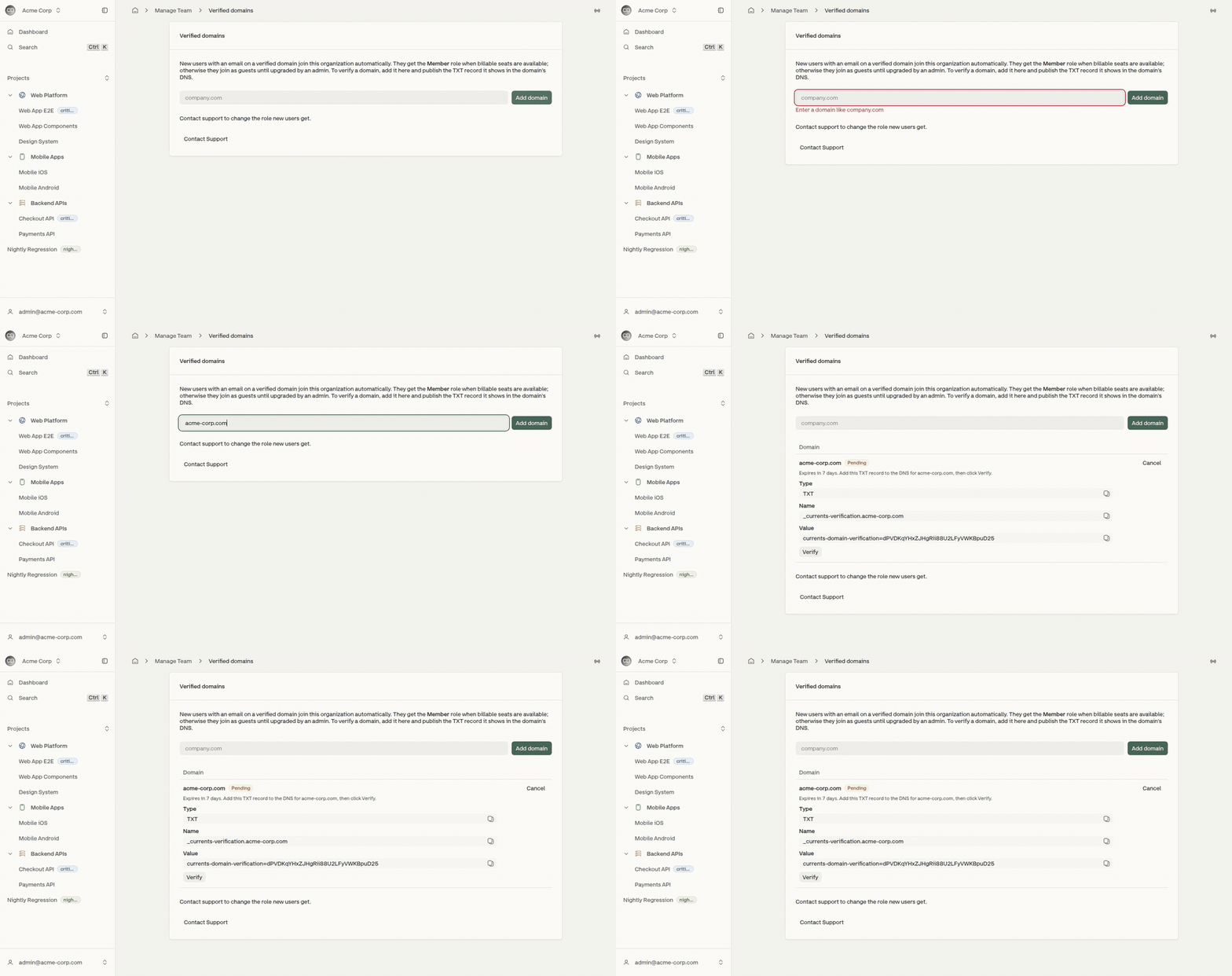
1. Enter the domain - the bare name, such as `company.com` - and select **Add domain**. The request appears as **Pending**.
2. Copy the TXT record Currents shows and publish it in that domain's DNS.
3. Select **Verify**.
Adding a domain returns the TXT record that proves control of it
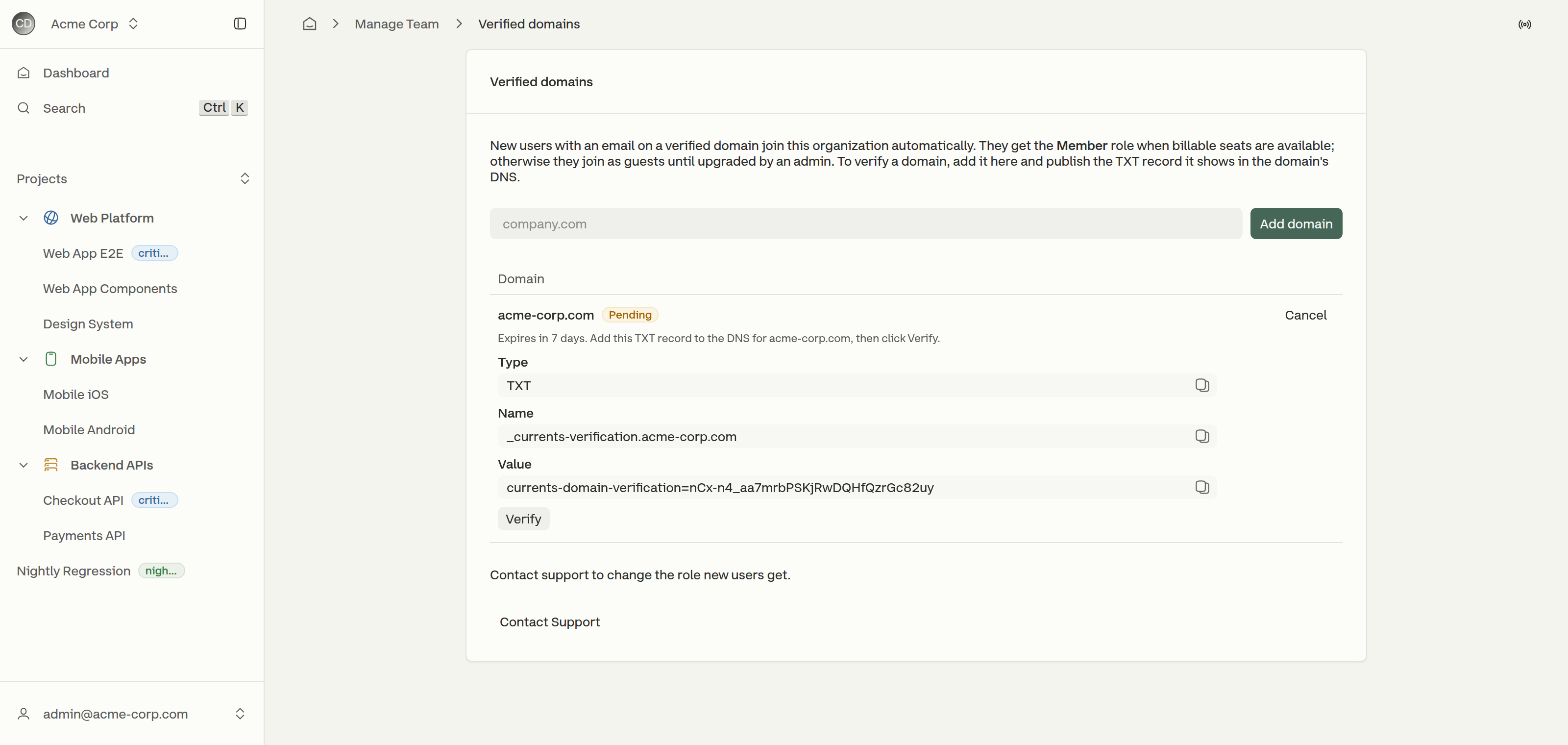
The record has three parts, each with a copy control next to it:
| Field | Value |
| --------- | -------------------------------------- |
| **Type** | `TXT` |
| **Name** | `_currents-verification.` |
| **Value** | `currents-domain-verification=` |
A pending domain and the record that verifies it
The token is generated per request and belongs to that request alone. **Verify** fails while the record is still propagating; the check can be repeated until it succeeds.
A pending request **expires after 7 days**, and a reminder goes out 2 days before that. Once it has expired, the domain has to be added again, which issues a new token. **Cancel** withdraws a pending request without waiting for it to expire.
## What a verified domain does
New users who sign up with an address on the domain join the organization automatically. They are **not** sent an invite and no administrator has to approve them.
The role they receive depends on seats:
* **Member**, when the organization has a billable seat free.
* **Guest**, when it does not - until an administrator upgrades them. Guests do not occupy a seat, so the upgrade is what takes one.
To change which role new users receive, contact Currents support from the link on the page.
## Keeping a domain verified
Currents re-checks each verified domain's TXT record once a day, so the record has to stay published after verification. A failed check notifies the organization's administrators, and after **7 failed checks in a row** the domain is removed and auto-join stops with it. Getting it back means adding the domain again and verifying a fresh token.
**Remove** takes a verified domain off the list at any time. New users on that domain stop joining the organization automatically; accounts that already joined keep their membership.
## Emails to administrators
An organization's administrators are emailed at each point in a domain's life:
| Email | Sent when |
| -------------------------- | ----------------------------------------------------------------------------------- |
| **Domain verified** | the TXT record is found and the domain starts accepting new users |
| **Reminder before expiry** | a pending request is 2 days from expiring |
| **Request expired** | a pending request reaches 7 days without being verified |
| **Daily check failed** | a daily re-check of a verified domain cannot find its record |
| **Domain removed** | a verified domain is removed, by an administrator or after 7 failed checks in a row |
{% hint style="info" %}
Verifying a domain does not change how anyone signs in. It decides which organization a new account joins. To make an identity provider the way an organization signs in, see [SSO SAML2.0](/dashboard/administration/sso-saml2.0.md) — SSO carries its own domain list.
{% endhint %}
Verification applies to new accounts. Someone who already has a Currents account on that domain is brought in the usual way, from [Manage Team](/dashboard/administration/manage-team.md).
---
# Agent Instructions
This documentation is published with GitBook. GitBook is the documentation platform designed so that both humans and AI agents can read, navigate, and reason over technical content effectively. Learn more at gitbook.com.
## Querying This Documentation
If you need additional information that is not directly available in this page, you can query the documentation by asking a question.
Perform an HTTP GET request on the following URL with the `ask` and `goal` query parameters:
```
GET https://docs.currents.dev/dashboard/administration/email-domain-based-access.md?ask=&goal=
```
`ask` is the immediate question: it should be specific, self-contained, and written in natural language.
`goal` is what the user is ultimately trying to achieve, the reason they need the answer. Sharing it helps GitBook give you a better, more relevant answer. A goal is most helpful when it describes the outcome the user wants rather than restating the question. For example, with `ask=how do I create an API token`, a goal like `automate deployments from our CI pipeline` lets GitBook tailor the answer to that use case.
The response will contain a direct answer to the question and relevant excerpts and sources from the documentation.
Use this mechanism when the answer is not explicitly present in the current page, you need clarification or additional context, or you want to retrieve related documentation sections.