> For the complete documentation index, see [llms.txt](https://docs.currents.dev/llms.txt). Markdown versions of documentation pages are available by appending `.md` to page URLs; this page is available as [Markdown](https://docs.currents.dev/getting-started/ci-setup/playwright-aws-code-build.md).
# AWS Code Build
Running Playwright Tests in Parallel on AWS CodeBuild and Currents
{% hint style="info" %}
TL;DR Check out the example repository:
[https://github.com/currents-dev/currents-examples](https://github.com/currents-dev/currents-examples/tree/main/playwright/ci/aws-codebuild)
{% endhint %}
Executing Playwright tests in parallel on AWS CodeBuild can significantly reduce the overall run duration. AWS CodeBuild supports [Batched Build](https://docs.aws.amazon.com/codebuild/latest/userguide/batch-build.html) in [matrix mode](https://docs.aws.amazon.com/codebuild/latest/userguide/batch-build.html#batch_build_matrix) for launching several workers in parallel.
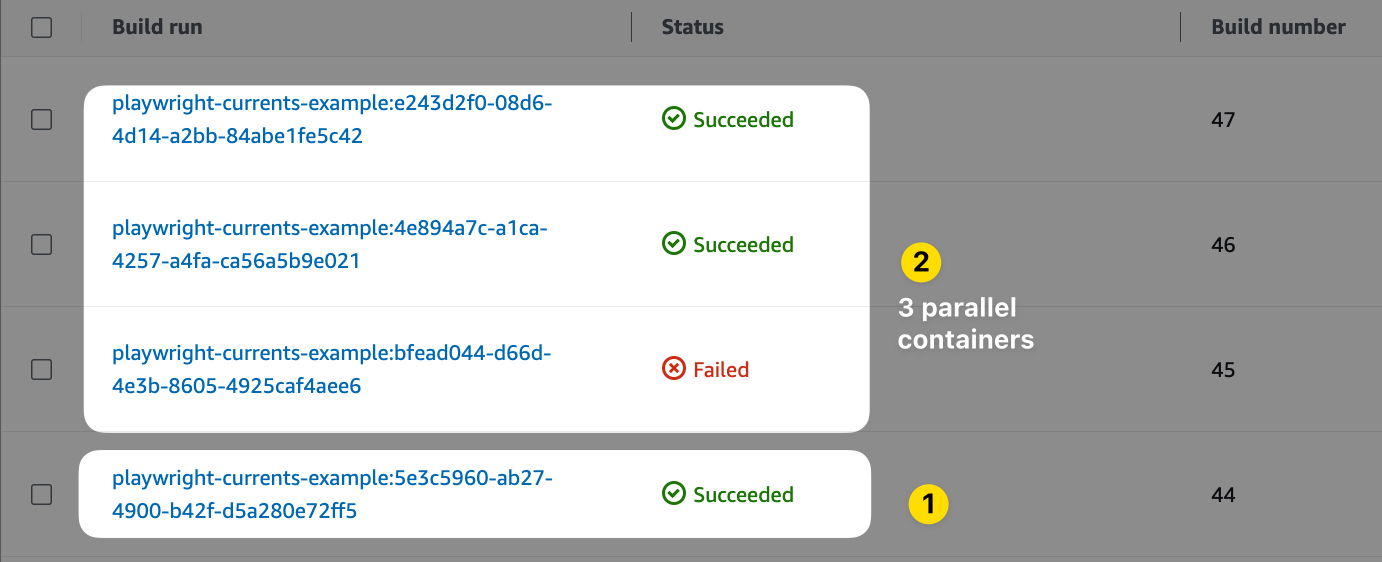
Use AWS CodeBulld Matrix mode to run Playwright tests in parallel with Currents. 1 batch job (1) triggering 3 parallel build jobs (2).
### Prerequisites
To enable parallel runs, please make sure that you have privileged access to your AWS Account and that you can create/modify an AWS CodeBuild Project.
### Configuration
#### Obtain Currents Credentials
Create an organization, and get [Record Key](/guides/record-key.md) and **Project ID** at [https://app.currents.dev](https://app.currents.dev/).
#### Create `buildspec.yml`
Create a `buildspec.yml` file in the root directory of your application's source code repository. This file defines the build and test steps for your application.
Set the **Project ID** for `pwc` command, for example:
{% hint style="info" %}
The example uses `pwc` CLI command to run the tests. You can use `npx playwright test` command and configure `@currents/playwright` as a reporter. Please refer to the [documentation](https://currents.dev/readme/integration-with-playwright/currents-playwright#currents-playwright-reporter).
{% endhint %}
The `buildspec.yml` file uses [matrix mode](https://docs.aws.amazon.com/codebuild/latest/userguide/batch-build) to start 3 containers for running the test in parallel. Each container will have the environment variable `WORKER` set to `1,2,3` correspondingly, we use it to configure [Playwright Sharding](https://playwright.dev/docs/test-parallel#shard-tests-between-multiple-machines) `--shard $WORKER/3`
```yaml
## buildspec.yml
version: 0.2
batch:
fast-fail: false
build-matrix:
dynamic:
buildspec:
- buildspec.yml
env:
variables:
WORKER:
- 1
- 2
- 3
phases:
install:
runtime-versions:
nodejs: 24
commands:
# install playwright and its dependencies
- npm ci
- npx playwright install
- npx playwright install-deps
build:
commands:
# Optionally, set COMMIT_INFO variables to override the default values. See https://currents.dev/readme/runs/run-details#playwright-cypress-git-information
# - export COMMIT_INFO_BRANCH="$(git rev-parse HEAD | xargs git name-rev |
# cut -d' ' -f2 | sed 's/remotes\/origin\///g')"
# - export COMMIT_INFO_MESSAGE="$(git log -1 --pretty=%B)"
# - export COMMIT_INFO_EMAIL="$(git log -1 --pretty=%ae)"
# - export COMMIT_INFO_AUTHOR="$(git log -1 --pretty=%an)"
# - export COMMIT_INFO_SHA="$(git log -1 --pretty=%H)"
# - export COMMIT_INFO_REMOTE="$(git config --get remote.origin.url)"
# update shard details according to the overall # of containers
- npx pwc --project-id --key $CURRENTS_RECORD_KEY --ci-build-id $CODEBUILD_INITIATOR --shard $WORKER/3
```
**Configure `CURRENTS_RECORD_KEY`**
Save the [Record Key](/guides/record-key.md) as `CURRENTS_RECORD_KEY` [Environment variable](https://docs.aws.amazon.com/codebuild/latest/userguide/change-project-console.html#change-project-console-environment). It is strongly recommended to use your **Record Key** in a secure secrets storage. Please refer to the [detailed guide](https://www.learnaws.org/2022/11/18/aws-codebuild-secrets-manager/), here is an overview of the steps:
* Create a new entry in AWS Secrets Manager with the **Record Key**. Please note that the generated secret is a JSON document, you should note the `json_key` of the actual record key value and use it later.
* Get the secret ARN
* Update the Build Project environment variables as follows:
* Variable name: `CURRENTS_RECORD_KEY`
* Variable value: the ARN of previously created secret + json\_key, for example: `:`
* Update the IAM execution role to allow reading of previously created secret
#### Configure AWS Project
Configure AWS-specific project settings like IAM execution policy, resources class and so on. Please refer to [AWS CodeBuild documentation](https://docs.aws.amazon.com/codebuild/) for details to explore possible configuration settings.
**Configure Source Batch Mode**
* Set the **Project Setting > Edit Source**
* Configure the repository details, the events that should trigger new builds
* Configure **Primary source webhook events > Build Type** to **Batch build** to start 3 parallel workers in [matrix mode](https://docs.aws.amazon.com/codebuild/latest/userguide/batch-build)
### Example: Triggering Parallel Playwright AWS CodeBuild
This [example repository](https://github.com/currents-dev/currents-examples/tree/main/playwright/ci/aws-codebuild) showcases running Playwright tests on AWS CodeBuild in parallel while using [Currents](https://currents.dev/) as the reporting dashboard. It has an example [AWS CodeBuilld Project configuration](https://github.com/currents-dev/currents-examples/blob/main/playwright/ci/aws-codebuild/aws-project-config-output.json).
{% embed url="" %}
Example of triggering an AWS CodeBuild Playwright Tests via a commit
{% endembed %}
[^1]: replace with real project id
---
# Agent Instructions
This documentation is published with GitBook. GitBook is the documentation platform designed so that both humans and AI agents can read, navigate, and reason over technical content effectively. Learn more at gitbook.com.
## Querying This Documentation
If you need additional information that is not directly available in this page, you can query the documentation by asking a question.
Perform an HTTP GET request on the following URL with the `ask` and `goal` query parameters:
```
GET https://docs.currents.dev/getting-started/ci-setup/playwright-aws-code-build.md?ask=&goal=
```
`ask` is the immediate question: it should be specific, self-contained, and written in natural language.
`goal` is what the user is ultimately trying to achieve, the reason they need the answer. Sharing it helps GitBook give you a better, more relevant answer. A goal is most helpful when it describes the outcome the user wants rather than restating the question. For example, with `ask=how do I create an API token`, a goal like `automate deployments from our CI pipeline` lets GitBook tailor the answer to that use case.
The response will contain a direct answer to the question and relevant excerpts and sources from the documentation.
Use this mechanism when the answer is not explicitly present in the current page, you need clarification or additional context, or you want to retrieve related documentation sections.