> For the complete documentation index, see [llms.txt](https://docs.currents.dev/llms.txt). Markdown versions of documentation pages are available by appending `.md` to page URLs; this page is available as [Markdown](https://docs.currents.dev/authentication/personal-access-tokens.md).

# Personal Access Tokens

A credential that acts as one person inside one organization, carrying only the permissions it was created with - creating one, what each permission reaches, and when a token stops working

A personal access token is a credential an administrator creates for themselves, in one organization, carrying a named set of permissions. Requests made with it act as its owner and reach exactly what those permissions cover.

It answers the case the other two credentials leave open. An [API key](/dashboard/administration/api-keys.md) belongs to the organization and carries a single **Read Only** or **Read & Write** level over the whole API, so it cannot be narrowed to one job. An [OAuth](/authentication/oauth.md) grant is granular and belongs to a person, but it exists to authorize an *application*: something has to run the browser flow, and staying connected past the first access token means holding a refresh token. A personal access token is granular and belongs to a person, with nothing to install and no flow to complete - it is created in the dashboard, copied once, and pasted wherever it is needed.

|              | Personal access token                                             | OAuth access token                                                                                                                                       | API key                                     |
| ------------ | ----------------------------------------------------------------- | -------------------------------------------------------------------------------------------------------------------------------------------------------- | ------------------------------------------- |
| Belongs to   | A person                                                          | A person                                                                                                                                                 | An organization                             |
| Reaches      | One organization, chosen when it was created                      | One organization, chosen when it was authorized                                                                                                          | The organization it was created in          |
| Permissions  | The set chosen at creation, fixed for its life                    | The set consented to, capped by the member's role                                                                                                        | One **Read Only** or **Read & Write** level |
| Obtained by  | Creating it in the dashboard and copying it once                  | Approving a screen in the browser                                                                                                                        | Copying a value out of the dashboard        |
| Created by   | An administrator, for themselves only                             | Any member, by authorizing an application                                                                                                                | An administrator                            |
| Expires      | On a date set at creation, at most a year out                     | On its own; an application that asked for `offline_access` renews it while the grant stands, and one that did not sends the person back through the flow | Never                                       |
| Ends when    | It expires, is revoked, or its owner stops being an administrator | The person or an administrator revokes it, which stops renewal at once and leaves an issued access token working for up to an hour                       | The key is deleted                          |
| Attributable | Yes - it names the person who created it                          | Yes - actions carry the person who authorized it                                                                                                         | No - a key names no user                    |

Those last two rows go together. An organization API key names no user and outlives whoever created it, which is why a key left behind by someone who has since left the company keeps working. A personal access token names its owner and is tied to their administrator access, so it goes when that access goes.

A [record key](/guides/record-key.md) is none of these. It identifies a project for a reporter to upload results into, and reaches nothing else.

## Who can create one

Only an **Admin** of the organization, and only for themselves. There is no way to create a token on someone else's behalf: the owner is always the account that created it, whatever the request says.

**Actions Admin**, **Member** and **Guest** cannot create tokens. See [Manage Team](/dashboard/administration/manage-team.md) for what each role covers.

Administrator status is not just a check at creation. It is re-read on every request the token makes, so a token stops authenticating the moment its owner's role drops below **Admin**, and there is no window in which the old role still applies.

{% hint style="info" %}
A token carries the permissions picked for it, not the permissions of its owner's role. An administrator who creates a token with `results:read` alone has a credential that reads test results and can do nothing else, even though the person holding it can do far more in the dashboard.
{% endhint %}

## Creating a token

Tokens are created and managed under **Account → Personal Access Tokens**, reached from the account menu in the sidebar or from the **Personal access tokens** card on the account page.

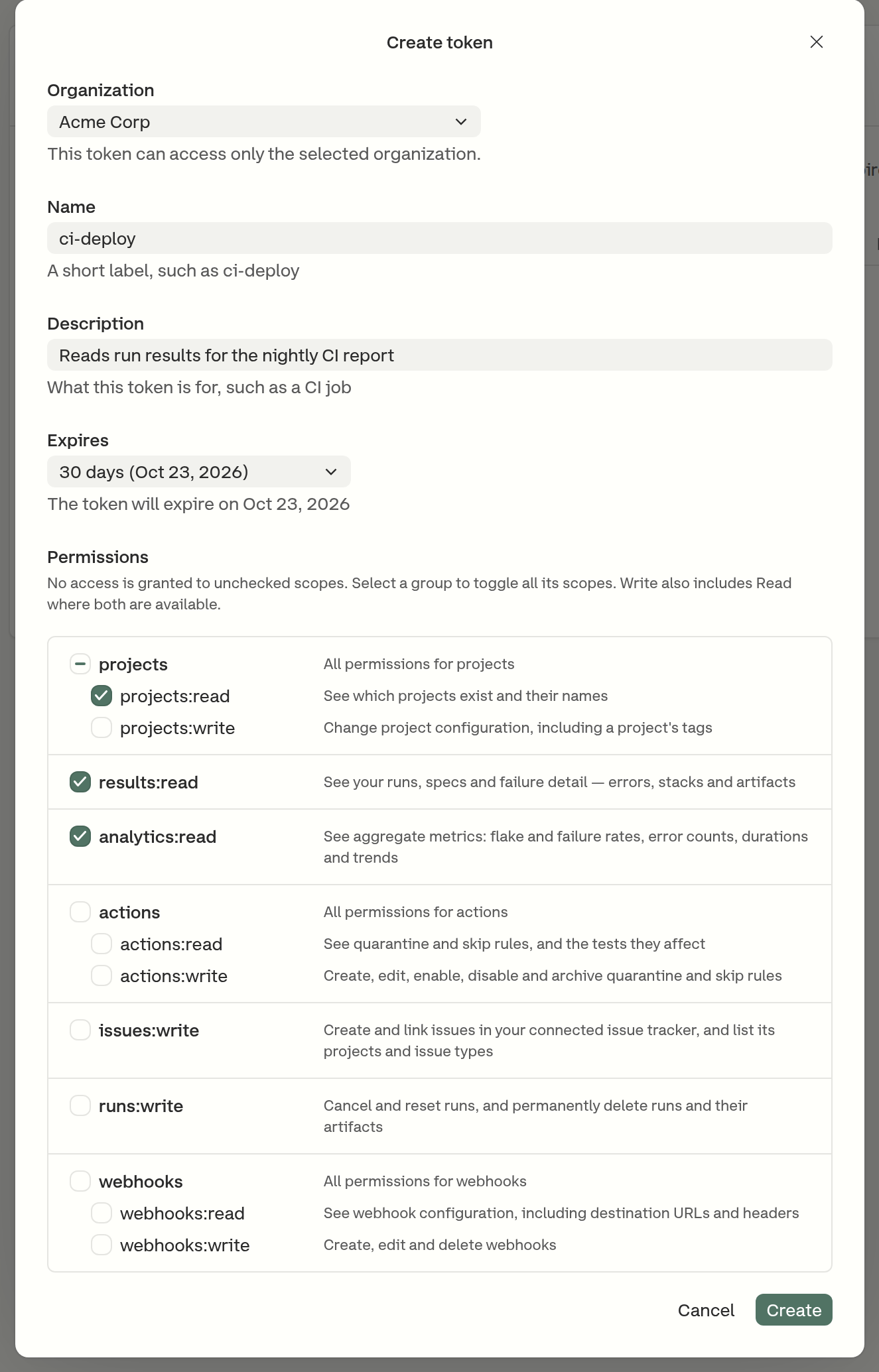
1. Click **Create token**
2. Choose the **Organization** the token will reach. The list holds only organizations where the account is currently an administrator
3. Enter a **Name**, up to 64 characters. It identifies the token in the list and in audit events
4. Optionally enter a **Description**, up to 256 characters, recording what the token is for
5. Choose when it **Expires** (see [Expiry](#expiry))
6. Select the **Permissions** the token will carry. At least one is required
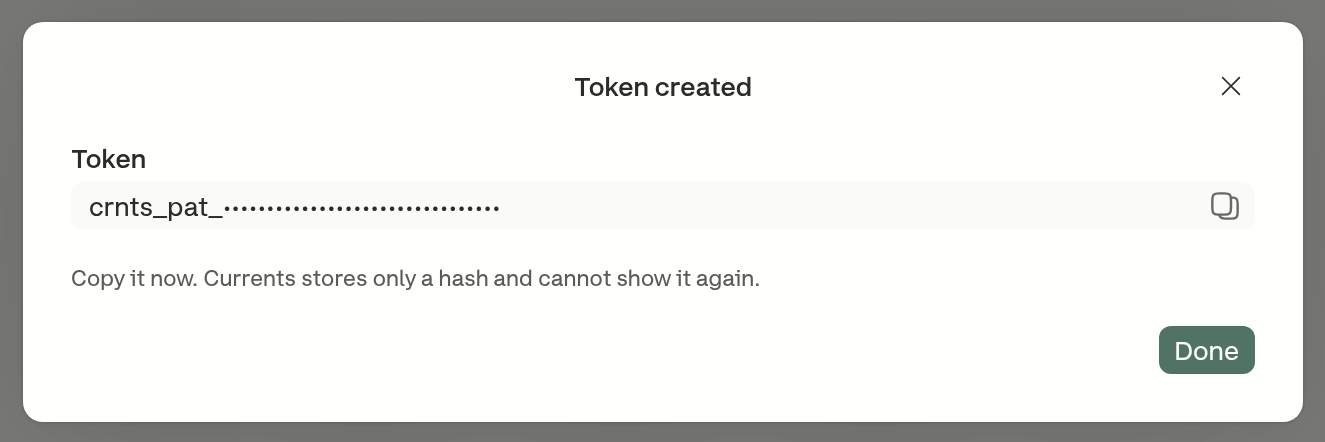
7. Click **Create**, then copy the token from the **Token created** dialog

<figure><img src="https://3745692499-files.gitbook.io/~/files/v0/b/gitbook-x-prod.appspot.com/o/spaces%2FqmFDEiUa9mr11LUlxDnt%2Fuploads%2Fgit-blob-9e3688cf00d20339fc34bae6b09f277db4dcb82f%2Fpat-create-token.png?alt=media" alt="The Create token dialog, with the organization, name, description and expiry filled in and three read permissions selected"><figcaption><p>Nothing is granted that is not checked here</p></figcaption></figure>

A token reaches one organization and is never moved to another. An administrator of two organizations who needs access to both creates a token in each.

## Permissions

A token carries a set of named permissions chosen when it is created. Each one covers a specific area, and an endpoint that needs a permission the token does not hold refuses the request.

The permission list is grouped by resource. Where a resource has both a read and a write permission, selecting the write selects the read with it, because a write operation reads before it writes, and clearing the read clears the write. `issues:write` and `runs:write` have no read counterpart and stand on their own, so selecting either one grants exactly what it says and nothing else.

| Permission       | What it reaches                                                                                                     |
| ---------------- | ------------------------------------------------------------------------------------------------------------------- |
| `projects:read`  | Which projects exist, and a project's settings, tags, branches and authors                                          |
| `projects:write` | Project configuration, including a project's tags                                                                   |
| `results:read`   | Runs, spec files, test results, failure evidence, and the runs on a pull request                                    |
| `analytics:read` | Aggregate metrics - project insights, error counts, and spec-file and test performance                              |
| `actions:read`   | Quarantine, skip and tag rules, and the tests they affected                                                         |
| `actions:write`  | Creating, editing, enabling, disabling and archiving those rules                                                    |
| `issues:write`   | Creating and linking issues in the organization's connected issue tracker, and listing its projects and issue types |
| `runs:write`     | Cancelling and resetting runs, and deleting runs and their artifacts                                                |
| `webhooks:read`  | Webhook configuration, including destination URLs and headers                                                       |
| `webhooks:write` | Creating, editing and deleting webhooks                                                                             |

{% hint style="danger" %}
`runs:write` includes permanently deleting a run and everything recorded with it, and `webhooks:write` and `actions:write` include deleting a configuration outright. None of these can be undone from Currents. Grant them only to a token that needs them.
{% endhint %}

Permissions are fixed for the life of a token. There is no way to add one to a token that already exists - a token needing wider access is replaced by a new one, and the old one revoked. Existing tokens are never widened, so a token holding `projects:write` and not `projects:read` keeps exactly that grant even though the creation form would not produce it today.

### Permissions a token cannot carry

The identity permissions - `openid`, `profile`, `email` and `offline_access` - exist elsewhere in Currents and are not offered to a token. They are excluded because they describe sign-in rather than access. They shape what an application learns about the person who authorized it and whether it may stay connected. A personal access token already names its owner and is renewed by creating a new one, so none of them mean anything here.

## Expiry

Every token expires, and an expiry date is required at creation. The furthest a token can be set to expire is one year from the day it is created.

The **Expires** field offers 7, 30, 60 and 90 days and 1 year, and defaults to **30 days**. **Custom** opens a date picker covering tomorrow through the one-year ceiling. The chosen day is stored as the end of that day, so a token set to expire on the 30th works throughout the 30th. Dates are shown in each viewer's own time zone.

Once a token is past its expiry, requests made with it are refused and the row in the token list shows an **Expired** badge. Expired tokens stay in the list so they can still be revoked, and an expired token cannot be renewed or extended - it is replaced by a new one.

## Copying the token

The token is shown once, in the **Token created** dialog, and never again. Currents stores only a hash of it, so a token that was not copied cannot be recovered - it is revoked and replaced.

<figure><img src="https://3745692499-files.gitbook.io/~/files/v0/b/gitbook-x-prod.appspot.com/o/spaces%2FqmFDEiUa9mr11LUlxDnt%2Fuploads%2Fgit-blob-bbb43a39b4f72a0f225a51c7ddfa33995200f0dc%2Fpat-token-created.png?alt=media" alt="The Token created dialog, showing the crnts_pat_ prefix with the rest of the value obscured for this screenshot, and a warning that Currents stores only a hash and cannot show it again"><figcaption><p>The only time the token is displayed. The value is obscured in this screenshot; the dialog shows it in full.</p></figcaption></figure>

Tokens begin with `crnts_pat_`, which makes them recognizable on sight in logs, configuration files and pull requests.

{% hint style="warning" %}
A personal access token is a password that acts as its owner. It belongs in a secret manager or a CI secret store, never in source control, a ticket or a chat message. Anyone holding the token has everything it was granted, for as long as it is valid.
{% endhint %}

## Using a token

A token is sent as a bearer token in the `Authorization` header, the same way an API key is.

### REST API

Almost every endpoint requires one named permission, so a token is not a blanket read or write. A few take an API key and nothing else, and refuse a token whatever it carries - see [Refusals](#refusals).

```bash
# projects:read - list the organization's projects
curl https://api.currents.dev/v1/projects \
-H "Authorization: Bearer crnts_pat_TOKEN_HERE"

# results:read - read a run
curl https://api.currents.dev/v1/runs/RUN_ID \
-H "Authorization: Bearer crnts_pat_TOKEN_HERE"

# runs:write - cancel a run
curl -X PUT https://api.currents.dev/v1/runs/RUN_ID/cancel \
-H "Authorization: Bearer crnts_pat_TOKEN_HERE"

# webhooks:read - list a project's webhooks
curl "https://api.currents.dev/v1/webhooks?projectId=PROJECT_ID" \
-H "Authorization: Bearer crnts_pat_TOKEN_HERE"
```

### Remote MCP server

The remote MCP server at `https://mcp.currents.dev/mcp` accepts a personal access token in the same header. The tool list is filtered to the token's permissions: a tool whose permission the token does not hold is not offered at all, rather than offered and then refused. An agent connected with a `results:read` token is handed the tools that read runs and test results, and never sees the tool that deletes a run.

One tool sits outside that filter. `currents-get-tests-signatures` computes a signature from values the caller already holds and reaches no organization data, so it is listed for every connection whatever the token carries.

Because a permission-gated tool the token cannot reach is absent rather than rejected, a client that names it anyway is told no such tool exists.

Widening what an agent can do means creating a new token with the extra permissions and reconnecting with it. Unlike an OAuth connection, a personal access token cannot be re-authorized in place.

See [Any MCP client](/ai/connect/remote.md) for connecting an agent to that endpoint.

### Refusals

| Status                                   | Meaning                                                                                                                                                                                                                 |
| ---------------------------------------- | ----------------------------------------------------------------------------------------------------------------------------------------------------------------------------------------------------------------------- |
| `401` Invalid authentication credentials | The token is malformed, revoked, expired, or its owner is no longer an administrator of the organization. These are deliberately indistinguishable, so a caller cannot use the refusal to learn whether a token exists. |
| `403` `insufficient_scope`               | The endpoint requires a permission the token does not carry. The refusal names the permission, so it is clear what a replacement token needs.                                                                           |
| `403` `api_key_required`                 | The endpoint takes an API key and nothing else. No permission reaches it.                                                                                                                                               |

Discriminate on the `code` field rather than on the message, which is free-form.

## Reviewing and revoking tokens

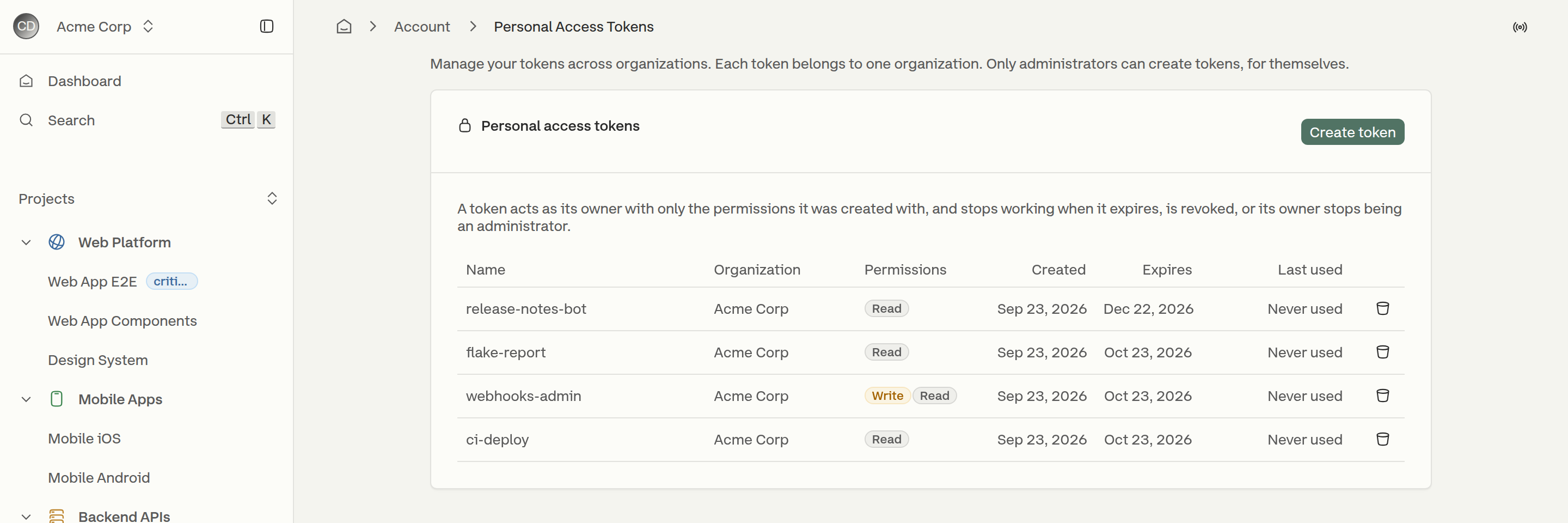
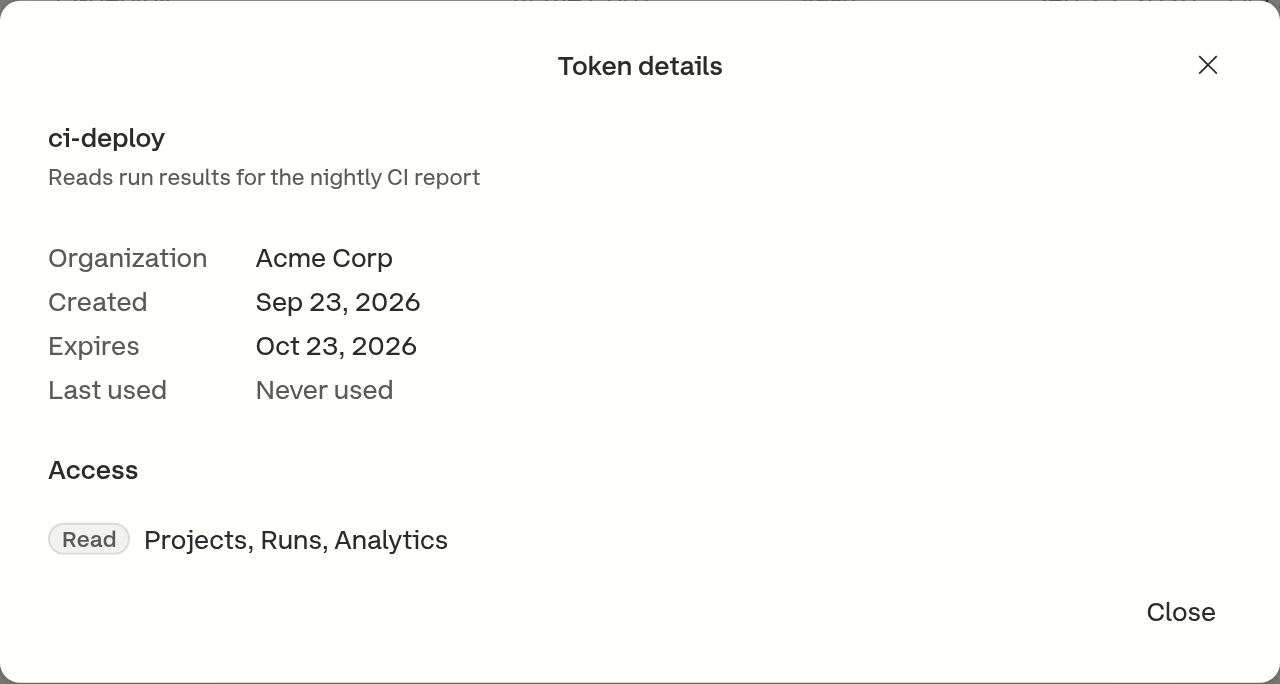
Each person sees their own tokens across every organization under **Account → Personal Access Tokens**, with the organization each one belongs to, whether it can read or write, when it was created, when it expires and when it was last used. Opening a row shows the token's description and the areas its permissions cover.

An administrator sees every token in their organization, whoever owns it, in the **Personal access tokens** section of **Organization → API & Record Keys**, and can revoke any of them. Administrators cannot create a token for anyone else - that section is for oversight, and the link in it leads to account settings for creating one's own.

<figure><img src="https://3745692499-files.gitbook.io/~/files/v0/b/gitbook-x-prod.appspot.com/o/spaces%2FqmFDEiUa9mr11LUlxDnt%2Fuploads%2Fgit-blob-5dc780db5a6ec0748e9d0e02b3d3c67ff0fb2bc5%2Fpat-token-list.png?alt=media" alt="The Personal access tokens table listing four tokens with their organization, Read and Write access badges, creation and expiry dates, and last use"><figcaption><p>Account → Personal Access Tokens</p></figcaption></figure>

<figure><img src="https://3745692499-files.gitbook.io/~/files/v0/b/gitbook-x-prod.appspot.com/o/spaces%2FqmFDEiUa9mr11LUlxDnt%2Fuploads%2Fgit-blob-32de290c8541abd693ef4c098cbfec6c261d1267%2Fpat-token-details.png?alt=media" alt="The Token details dialog for ci-deploy, showing its description, organization, creation and expiry dates, last use, and read access to Projects, Runs and Analytics"><figcaption><p>A token's details, opened from its row</p></figcaption></figure>

Revoking is immediate. Anything using the token fails on its next request, and other tokens and the organization's API keys are unaffected. A token cannot be un-revoked.

The owner of a token can revoke it even after leaving the organization it belongs to.

## When a token stops working

A token stops authenticating when any of the following happens. The two effects are different in a way that matters when reading the token list. **Revoked** means the token record itself is marked dead, which is what removes it from the list. **Refused** means every request with it is denied while the record stays in place, so the token can still be listed as though it were live until someone revokes it.

| What happened                                           | Effect                                                        |
| ------------------------------------------------------- | ------------------------------------------------------------- |
| The owner revoked it                                    | Revoked                                                       |
| An administrator revoked it                             | Revoked                                                       |
| The owner's role dropped below **Admin**                | Refused, and the record stays listed until someone revokes it |
| The owner was removed from the organization, or left it | Refused at once, and revoked once the cleanup lands           |
| The owner was deprovisioned through SCIM                | Revoked                                                       |
| The organization was deactivated                        | Revoked                                                       |
| The token passed its expiry date                        | Refused, and shown as **Expired** in the list                 |
| The owner left the organization and later rejoined      | Refused                                                       |

The last row is the backstop for the fourth. Removing someone from an organization stops their tokens there on the next request, because membership and role are re-read every time. Marking those records revoked is a separate, best-effort cleanup, so a token whose revocation did not land is already refused while still listed as live. Authentication closes the gap from the other side as well: it refuses any token issued before its owner's current membership began. So leaving and rejoining never restores a token, whether or not the revocation succeeded, and a person re-added to an organization starts with none there.

{% hint style="info" %}
A token that appears in the list is not necessarily a token that works. The list reports whether a token was revoked; it does not re-check the conditions that are evaluated on each request. A token whose owner is no longer an administrator may still be listed, and revoking it there is still what removes it.
{% endhint %}

## Related

* [OAuth](/authentication/oauth.md) - authorizing an application to act as a person
* [API Keys](/dashboard/administration/api-keys.md) - the organization-wide credential
* [Remote MCP Server](/ai/connect/remote.md) - connecting an agent to Currents
* [Manage Team](/dashboard/administration/manage-team.md) - the roles, and who holds **Admin**


---

# Agent Instructions
This documentation is published with GitBook. GitBook is the documentation platform designed so that both humans and AI agents can read, navigate, and reason over technical content effectively. Learn more at gitbook.com.

## Querying This Documentation
If you need additional information that is not directly available in this page, you can query the documentation by asking a question.

Perform an HTTP GET request on the following URL with the `ask` and `goal` query parameters:

```
GET https://docs.currents.dev/authentication/personal-access-tokens.md?ask=<question>&goal=<user_goal>
```

`ask` is the immediate question: it should be specific, self-contained, and written in natural language.
`goal` is what the user is ultimately trying to achieve, the reason they need the answer. Sharing it helps GitBook give you a better, more relevant answer. A goal is most helpful when it describes the outcome the user wants rather than restating the question. For example, with `ask=how do I create an API token`, a goal like `automate deployments from our CI pipeline` lets GitBook tailor the answer to that use case.

The response will contain a direct answer to the question and relevant excerpts and sources from the documentation.

Use this mechanism when the answer is not explicitly present in the current page, you need clarification or additional context, or you want to retrieve related documentation sections.