> For the complete documentation index, see [llms.txt](https://docs.currents.dev/llms.txt). Markdown versions of documentation pages are available by appending `.md` to page URLs; this page is available as [Markdown](https://docs.currents.dev/ai/agentic-testing/prove-a-change.md).
# Prove a change with CI tests
Prove an AI agent's change works with the CI tests that cover it: before and after screenshots, videos and traces from the runs Currents already stores
When a test in CI covers the change, the evidence is already in Currents. You do not need to run anything again, record the screen or take screenshots by hand. Currents stored every file of each test that ran: screenshots, videos, traces and the attachments your tests add. The failing run is the before, and the run on the branch with the fix is the after. The agent finds both runs and shows what changed, with links anyone can open.
Your agent needs the Currents MCP server. See [Connect your agent](/ai/connect.md).
## Example: evidence from two CI runs
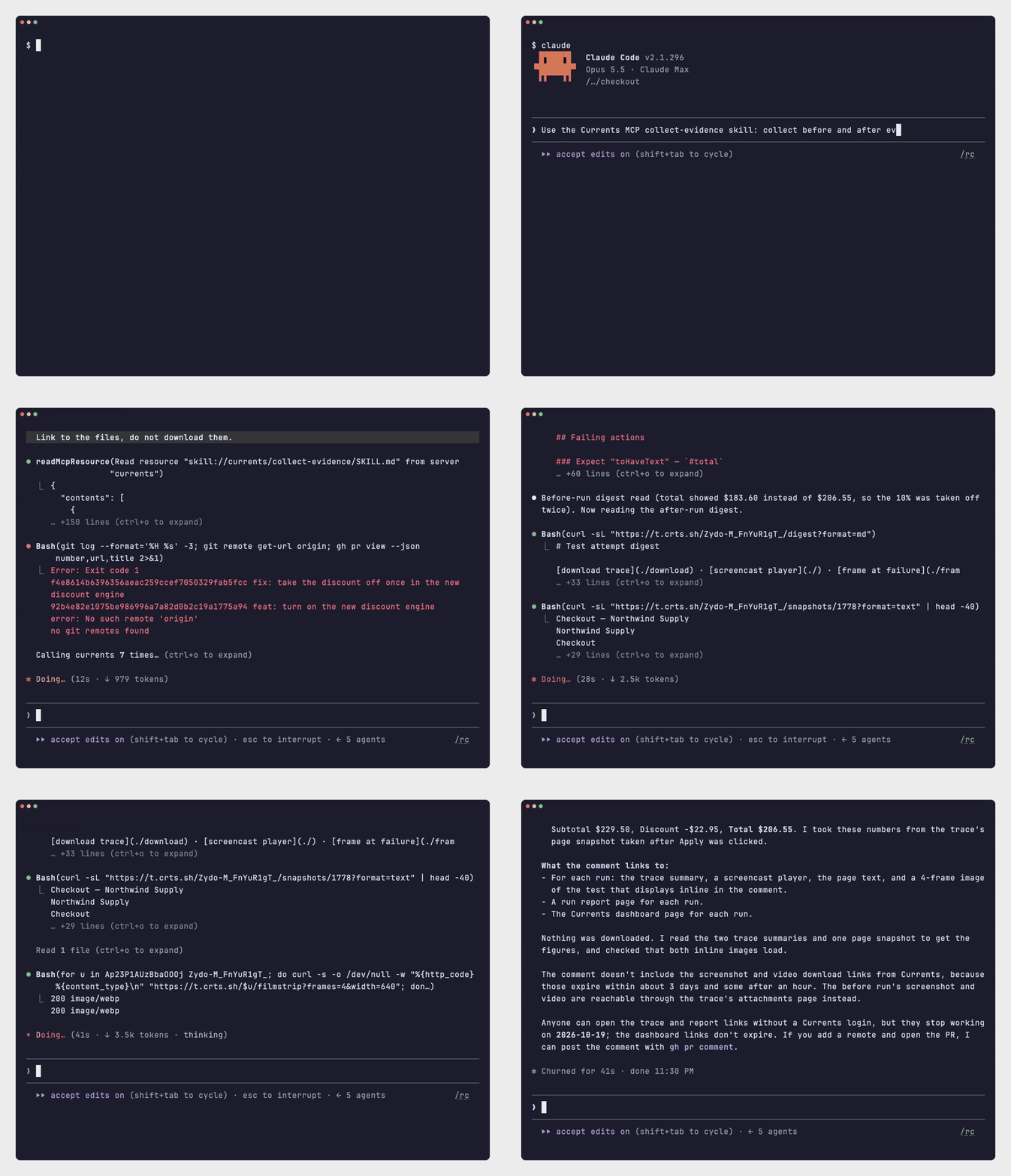
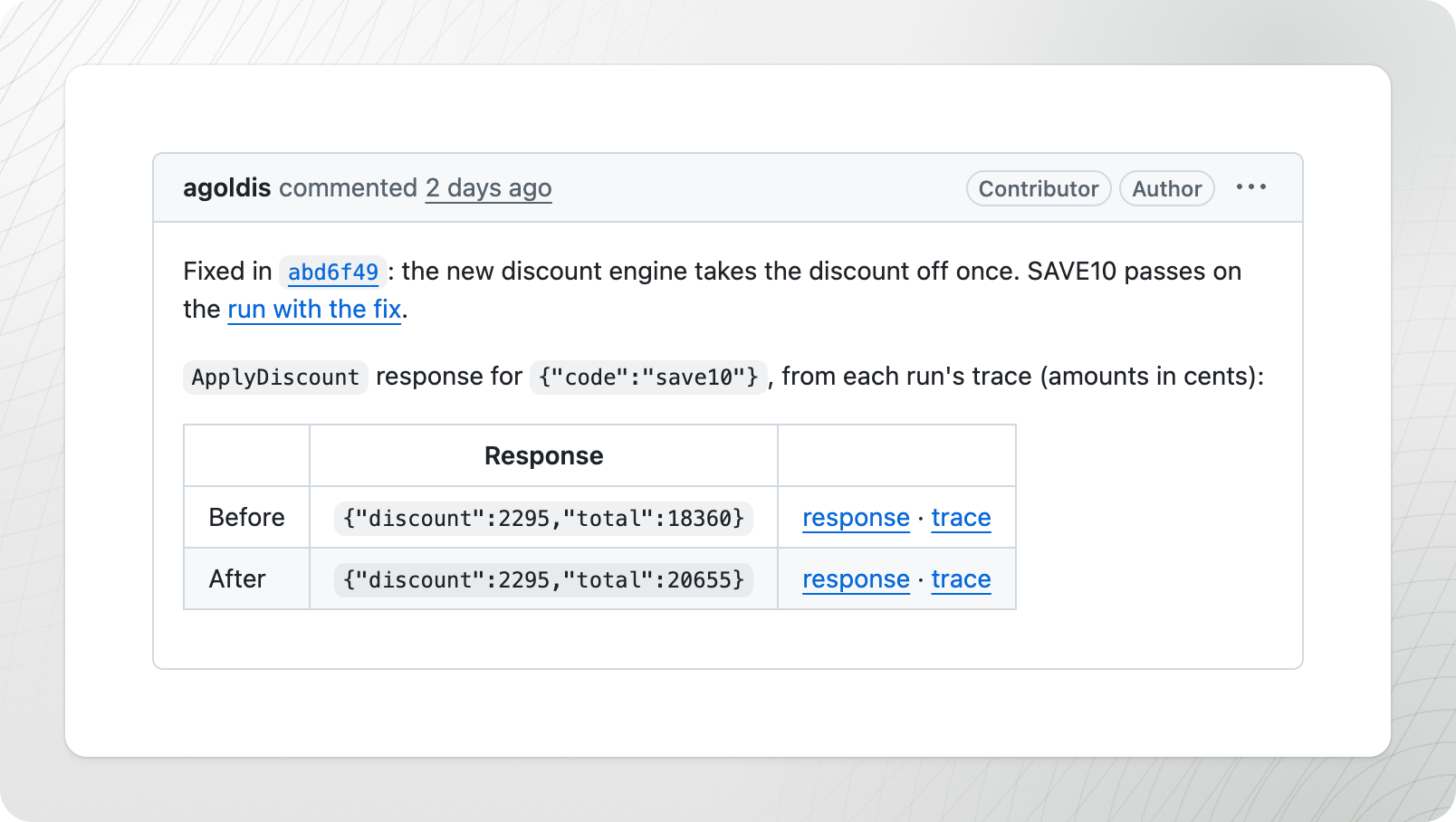
In this recording, Claude Code is connected to the Currents MCP server. The branch has two runs in Currents: a failed run before the fix and a passed run after it. The agent reads the trace of each run, takes the order total from the page in each trace, and writes a pull request comment with links to the traces and run reports. The recording is sped up.
## Ask the agent
Name the skill in the prompt, so the agent follows its steps:
```
Fix the checkout total bug. Once CI has run on this branch, use the Currents
MCP collect-evidence skill to collect before and after evidence, and post it
as a comment on the pull request.
```
The `collect-evidence` skill comes with the Currents MCP server, so there is nothing to install. See [Currents MCP server skills](/ai/agent-skills/agent-skill-currents-mcp.md). The skill reads only runs that CI already finished. It does not wait for a run in progress.
A passing test keeps a trace only if Playwright is set to keep one. With `trace: 'retain-on-failure'`, the after has screenshots and attachments but no trace. To keep a trace for the after too, set `trace: 'on'` for the tests that prove the change.
## What counts as evidence
Any file a test produced is evidence:
* Screenshots, to compare the page before and after
* Videos of the test, for a flow with many steps
* Attachments your tests add with `testInfo.attach()`, such as an API response, computed values or a CLI output
* The Playwright trace: a summary of the steps, a filmstrip and the page's accessibility tree at each step. The agent reads it through the trace API; see [Explore a trace](/ai/agentic-artifacts/explore-a-trace.md).
A trace gives the agent the most to work with, but it is not required.
## Post the evidence on the pull request
Ask the agent to write the result up as a pull request comment: what changed, the before and after, and the links. A reviewer then sees the evidence and the code in one place.
Currents does not post the comment. Give the agent a tool that can, such as the GitHub CLI or the Linear MCP server, and say where to post in the prompt. Every link is public until it expires; see [Share links](/ai/reference/share-links.md). For Slack and Linear, see [Post evidence to GitHub, Slack and Linear](/ai/agentic-artifacts/post-evidence.md).
## When no test covers the change
Have the agent record the browser before and after the fix instead. See [Record a bug and its fix](/ai/agent-evidence/bug-and-fix.md).
## Troubleshooting
| Symptom | Fix |
| ----------------------------------------- | -------------------------------------------------------------------------------------------------------------------------------------------------------------------------------------- |
| `No trace found for this test attempt` | The attempt kept no trace. The agent can use the screenshots, videos and attachments, or set `trace: 'on'` for the tests that prove the change. |
| The agent reports an older run than yours | The run on the branch is still in progress. Ask again when CI finishes. |
| A link or file returns `404` | The link expired, or the file is past [data retention](/resources/data-privacy/data-retention.md). Passed tests keep their files for 7 days, so collect the before and after together. |
---
# Agent Instructions
This documentation is published with GitBook. GitBook is the documentation platform designed so that both humans and AI agents can read, navigate, and reason over technical content effectively. Learn more at gitbook.com.
## Querying This Documentation
If you need additional information that is not directly available in this page, you can query the documentation by asking a question.
Perform an HTTP GET request on the following URL with the `ask` and `goal` query parameters:
```
GET https://docs.currents.dev/ai/agentic-testing/prove-a-change.md?ask=&goal=
```
`ask` is the immediate question: it should be specific, self-contained, and written in natural language.
`goal` is what the user is ultimately trying to achieve, the reason they need the answer. Sharing it helps GitBook give you a better, more relevant answer. A goal is most helpful when it describes the outcome the user wants rather than restating the question. For example, with `ask=how do I create an API token`, a goal like `automate deployments from our CI pipeline` lets GitBook tailor the answer to that use case.
The response will contain a direct answer to the question and relevant excerpts and sources from the documentation.
Use this mechanism when the answer is not explicitly present in the current page, you need clarification or additional context, or you want to retrieve related documentation sections.