> For the complete documentation index, see [llms.txt](https://docs.currents.dev/llms.txt). Markdown versions of documentation pages are available by appending `.md` to page URLs; this page is available as [Markdown](https://docs.currents.dev/ai/agentic-testing/fix-failing-tests.md).
# Fix failing CI tests
Hand a failing test to an AI agent with the full failure context, from the dashboard, Slack, the GitHub run comment, your editor or the MCP server
When a test fails in CI, an agent usually starts from the CI log: an assertion message, a stack trace and a few hundred lines of output. The log does not show what was on the page, which request returned the wrong data, or whether the test failed the same way last week. So the agent guesses. Often it adds a wait, loosens the assertion or retries until the test passes, and the bug stays in the code.
Currents keeps everything about each failure and gives it to the agent in one call:
* The page at the moment of failure: its accessibility tree, screenshots, video and the Playwright trace
* Browser console and network requests around the error
* The test's history: whether it is flaky, and the branch and commit where it started to fail
* The other tests in the run that failed with the same error
With that context the agent finds the cause in the app or in the test, fixes it, and runs the test again to check the fix.
Your agent needs the Currents MCP server. See [Connect your agent](/ai/connect.md). The dashboard, Slack and the GitHub run comment also hand a failure to any agent without a connection.
## Example: an agent fixes a failed run
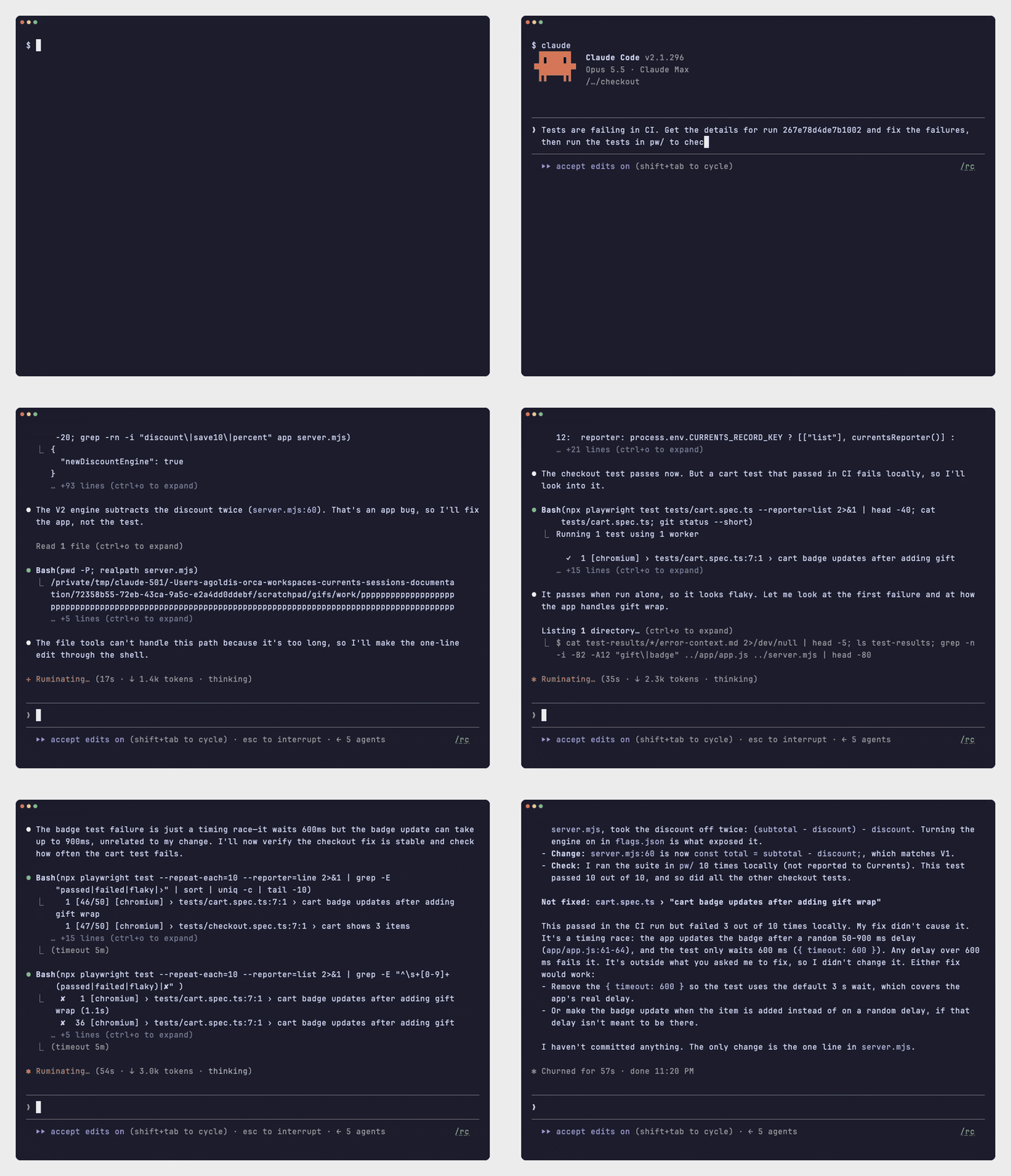
In this recording, Claude Code is connected to the Currents MCP server and gets the prompt from the first row of the table below. It reads the failed run from Currents and finds that the app's new discount calculation takes the discount off twice. It fixes the calculation and runs the tests again. It also reports a flaky test that it found, and does not change it. The recording is sped up.
## Hand a failure to an agent
| Where you are | What to use |
| ------------------------------------------------------------------ | ----------------------------------------------------------------------------------------------------------------------------------------------------------------------------- |
| Your agent, connected to the [Currents MCP server](/ai/connect.md) | Ask: "Tests are failing in CI. Get the details for run `` and fix the failures." |
| The dashboard | **Fix with AI** on a failed test, **Fix** on a run, or **Fix** in the right-click menu of a test |
| Slack | **Fix with AI** or **Fix all with AI** on a failure notification from the [Slack App](/resources/integrations/slack/slack-app.md#fix-with-ai) |
| A pull request | The **Fix with AI** section of the [GitHub run comment](/resources/integrations/github/github-app.md#fix-with-ai) on a failed run: a link for you and a prompt for your agent |
| VS Code or Cursor | **Fix with agent** in the [IDE Extension](/ai/connect/ide-extension.md#fix-with-ai) |
The run ID is in the run's URL in the dashboard, after `/run/`. You can also give the agent the run link, the pull request or the branch.
## Use the fix-failing-tests skill
The Currents MCP server gives the agent the `fix-failing-tests` skill, with the steps for this task. To make sure the agent uses it, name it in the prompt: "Use the Currents MCP fix-failing-tests skill". See [Currents MCP server skills](/ai/agent-skills/agent-skill-currents-mcp.md).
## Fix with AI in the dashboard
The **Fix with AI** menu on a failed test, and the **Fix** menu on a run, give these choices:
* Open the context in Claude, Claude Code, Codex, Conductor, Cursor, GitHub Copilot or Zed.
* **Copy as prompt**, to paste into any other agent, or **Download Markdown**.
* **Share failure context**, to create a Fix link.
## Share a Fix link
A [Fix link](/ai/reference/share-links.md) is a public link to the failure context of a test or a run. It opens a page with the context and buttons to open it in each agent. Give the link to someone outside your organization, or to an agent that fetches URLs. Add `.md` to the end of the link, and the agent reads the context as Markdown, with no credentials.
Slack and the GitHub run comment create a Fix link for you. A Fix link lasts 1 day unless you pick 3 or 7 days, and shows the failure as it was when you shared it. See [Share links](/ai/reference/share-links.md) for who can open it and how to turn sharing off.
## What the context contains
For one failed test:
* The spec, test title, status, attempt and duration
* The repository, branch, pull request and commit
* The error message and stack trace
* The error-context snapshot: the page's accessibility tree at the moment of failure
* Browser console and network requests around the error
* The trace error analysis, where a Playwright trace exists
* The steps that led to the failure, stdout and stderr
* Links to traces, screenshots, videos and attachments
* The OS, browser and versions, and how the other attempts ended
For a whole run: the run status and counts, the specs that did not pass, and each failing test with its error and steps. It lists how many files each test has, not links to them. Share a single test to get everything about one failure.
Every context ends with the IDs of the project, run, and, for one test, the instance, test and attempt. An agent connected to the [MCP server](/ai/reference/mcp-server.md) uses them to fetch more, such as other attempts or the test's history.
---
# Agent Instructions
This documentation is published with GitBook. GitBook is the documentation platform designed so that both humans and AI agents can read, navigate, and reason over technical content effectively. Learn more at gitbook.com.
## Querying This Documentation
If you need additional information that is not directly available in this page, you can query the documentation by asking a question.
Perform an HTTP GET request on the following URL with the `ask` and `goal` query parameters:
```
GET https://docs.currents.dev/ai/agentic-testing/fix-failing-tests.md?ask=&goal=
```
`ask` is the immediate question: it should be specific, self-contained, and written in natural language.
`goal` is what the user is ultimately trying to achieve, the reason they need the answer. Sharing it helps GitBook give you a better, more relevant answer. A goal is most helpful when it describes the outcome the user wants rather than restating the question. For example, with `ask=how do I create an API token`, a goal like `automate deployments from our CI pipeline` lets GitBook tailor the answer to that use case.
The response will contain a direct answer to the question and relevant excerpts and sources from the documentation.
Use this mechanism when the answer is not explicitly present in the current page, you need clarification or additional context, or you want to retrieve related documentation sections.