> For the complete documentation index, see [llms.txt](https://docs.currents.dev/llms.txt). Markdown versions of documentation pages are available by appending `.md` to page URLs; this page is available as [Markdown](https://docs.currents.dev/ai/agentic-artifacts/post-evidence.md).
# Post to GitHub, Slack, Linear
Have an AI agent post what Currents recorded, such as a session, a shared run, a Fix link, or one screenshot, video or trace image from them, on a GitHub pull request, in Slack or on a Linear issue
This page works for CI runs and for sessions an agent recorded. An agent can post anything Currents recorded where your team already works: on the pull request, in the Slack thread, or on the Linear issue. Reviewers see the screenshots, the recording and the failure next to the code or the discussion. They do not open Currents, run the tests again or ask the agent what it did.
The agent can post a whole recording as one link: a CI run, a failed test or a browser session. It can also post single items from it: one screenshot, one video, one file, or an image or text from a Playwright trace.
## What you need
* An agent connected to Currents, or a share link that you give it. See [Connect your agent](/ai/connect.md) and [Share links](/ai/reference/share-links.md).
* A tool that lets the agent post to the place, such as the GitHub CLI, the Slack MCP server or the [Linear MCP server](https://linear.app/docs/mcp). Currents gives the agent the links. It does not post the messages itself.
## What to post
| You want to | The agent posts |
| ----------------------------------------------------------------------- | -------------------------------------------------------------------------------------------------------------------------------- |
| Report a failed CI test | The error, the screen at the failure, and the [Fix link](/ai/reference/share-links.md), so another agent or person can fix it |
| [Prove a change with CI tests](/ai/agentic-testing/prove-a-change.md) | What changed, the before and after from the run before the change and the run after it, and the run links |
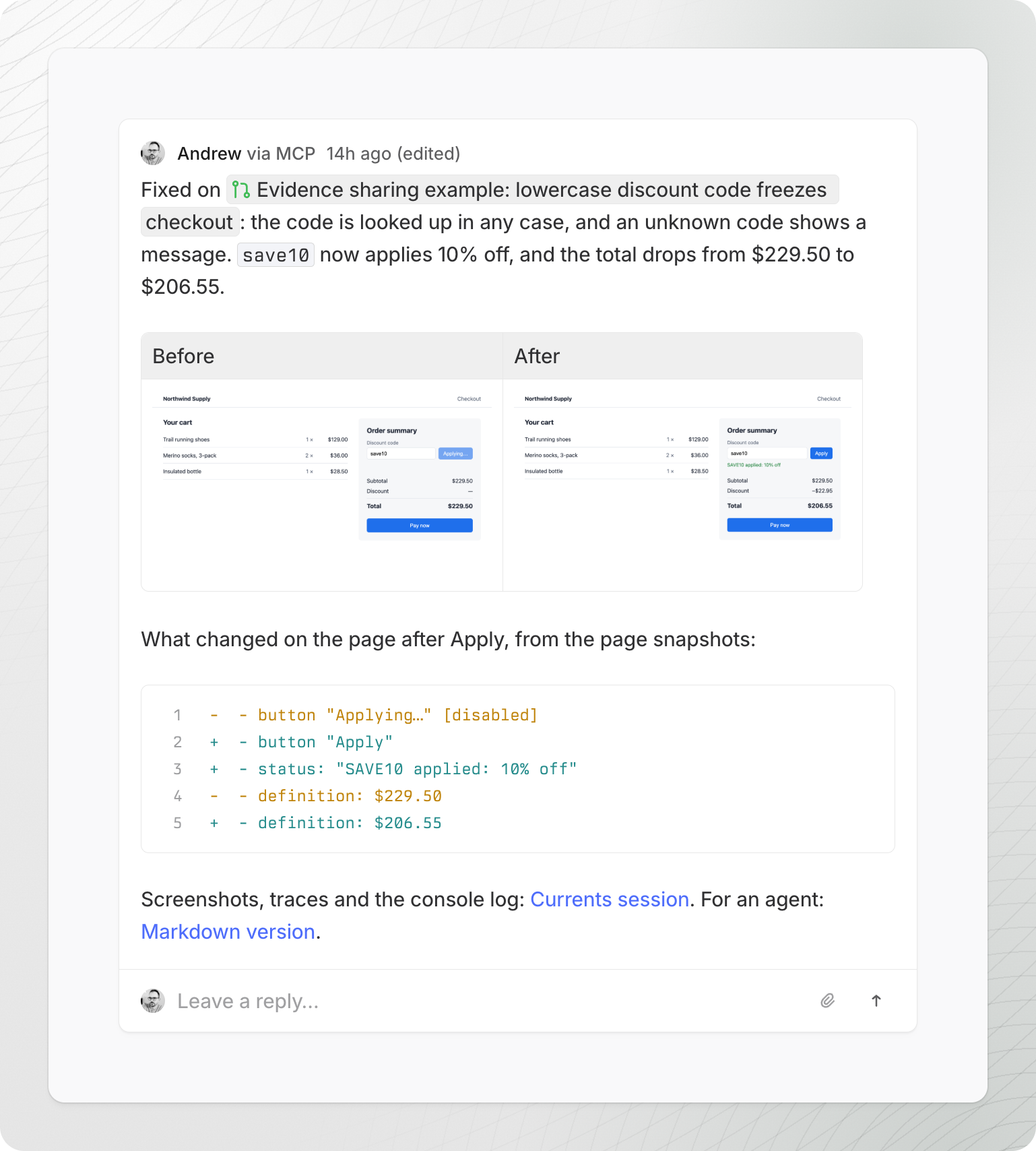
| [Prove a change that no test covers](/ai/agent-evidence/bug-and-fix.md) | What changed, the before and after screenshots, the page changes, and the session link |
| [Report the result of any task](/ai/agent-evidence/any-agent-task.md) | What it did, the files it made, and the session link |
| Show results to someone without Currents access | A summary and the link to a [Shared Run](/ai/agentic-testing/share-a-run.md) or a [Shared Session](/ai/reference/share-links.md) |
Give the page link to people. Give an agent the Markdown version: the same link with `.md` at the end.
## Post single items
The agent can also post one item from a recording instead of the whole link:
* One screenshot, video or other file from a session or a run
* From a Playwright trace: an [animation of the screen, a filmstrip](/ai/agentic-artifacts/explore-a-trace.md#available-formats) up to the failure, the screen at the failure, the page as it looked then, its accessibility tree, or a network request and its response
Ask for the items you want in the prompt. The agent gets each one from the trace API; see [Explore a trace](/ai/agentic-artifacts/explore-a-trace.md).
## GitHub
GitHub shows file links and trace images in Markdown, so the comment can hold the recording itself. Ask the agent:
```
Use the Currents MCP collect-evidence skill to collect before and after evidence
for this fix from CI, and post it on the pull request with gh. Show the
animation and the filmstrip of each run, and the API response that changed.
```
For the comment below, the prompt asked for the animation and the filmstrip of each run, the `ApplyDiscount` response, and the order summary from the accessibility tree. The agent got a trace API link for the failed test before the fix and one for the passed test after it, and built the comment from images and text of each trace:
For a fix that no test covers, the agent posts the screenshots and the page changes from its session:
The [GitHub App](/resources/integrations/github/github-app.md#pr-comments) also comments on each pull request with the results of its CI run and a Fix link for each failed test. The agent's evidence is a separate comment.
## Slack
Slack shows links, not images from Markdown. The agent posts a few lines of what changed and the link:
```
Post the result in #checkout: one line on what was broken, one line on what
the fix changed, and the Currents session link.
```
To report a failed CI test, ask for the error, the screen at the failure and the Fix link.
The [Slack App](/resources/integrations/slack/slack-app.md#fix-with-ai) posts failed CI tests to Slack with **Fix with AI**, which gives an agent the failure context. Reply in that thread with the evidence of the fix.
## Linear
Linear shows only images uploaded to Linear. A file link or a trace image link shows as "Failed to load image". The agent downloads the images, uploads them with the Linear MCP server, and puts the uploaded images in the comment:
```
Comment on ENG-123 with the before and after screenshots from the Currents
session: download them and upload them to Linear. Add what changed on the
page and the session link. Move the issue to In Review.
```
For a failed CI test, ask for the screen at the failure and the filmstrip from the trace, uploaded the same way, with the Fix link.
## When the links expire
Share links last 7 days at most. After that, an image in a GitHub comment stops showing, and the links stop opening. The text of the comment stays, and images uploaded to Linear stay. To show the evidence again, share the run or the session again and update the comment. See [Share links](/ai/reference/share-links.md).
---
# Agent Instructions
This documentation is published with GitBook. GitBook is the documentation platform designed so that both humans and AI agents can read, navigate, and reason over technical content effectively. Learn more at gitbook.com.
## Querying This Documentation
If you need additional information that is not directly available in this page, you can query the documentation by asking a question.
Perform an HTTP GET request on the following URL with the `ask` and `goal` query parameters:
```
GET https://docs.currents.dev/ai/agentic-artifacts/post-evidence.md?ask=&goal=
```
`ask` is the immediate question: it should be specific, self-contained, and written in natural language.
`goal` is what the user is ultimately trying to achieve, the reason they need the answer. Sharing it helps GitBook give you a better, more relevant answer. A goal is most helpful when it describes the outcome the user wants rather than restating the question. For example, with `ask=how do I create an API token`, a goal like `automate deployments from our CI pipeline` lets GitBook tailor the answer to that use case.
The response will contain a direct answer to the question and relevant excerpts and sources from the documentation.
Use this mechanism when the answer is not explicitly present in the current page, you need clarification or additional context, or you want to retrieve related documentation sections.