> For the complete documentation index, see [llms.txt](https://docs.currents.dev/llms.txt). Markdown versions of documentation pages are available by appending `.md` to page URLs; this page is available as [Markdown](https://docs.currents.dev/ai/agentic-artifacts/explore-a-trace.md).

# Explore a trace

Give an agent a trace API link, and let it read a Playwright trace in small steps instead of loading the whole file. Get images of the trace for people: filmstrip, animation, frames and the page at th

This page works for traces from CI tests and from sessions an agent recorded. A Playwright trace records everything a test or a [browser session](/ai/agent-evidence.md) did: every action, the page after each action, every network request, and a recording of the screen. A screenshot shows what the page looked like. The trace shows why.

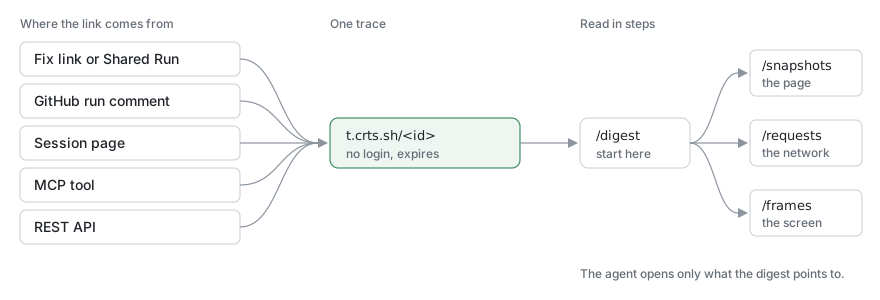
A trace file is a zip of several megabytes, too large for an agent to read at once, and people need the Playwright trace viewer to open it. The Currents trace API solves both:

* An agent reads the trace one small part at a time. It starts with a summary of the actions and the failure, then asks only for the page, request or screen that the summary points to.
* People get images from the same API: a filmstrip, an animation, the screen at the failure, or the page as it looked then. Put them in a pull request or an issue. See [Post evidence to GitHub, Slack and Linear](/ai/agentic-artifacts/post-evidence.md).

<figure><img src="https://3745692499-files.gitbook.io/~/files/v0/b/gitbook-x-prod.appspot.com/o/spaces%2FqmFDEiUa9mr11LUlxDnt%2Fuploads%2Fgit-blob-7dfe3993f75881479b2045d5fd86f257f6eee6be%2Ftrace-link-flow.svg?alt=media" alt="Fix links, Shared Runs, the GitHub run comment, session pages, the MCP tool and the REST API all give a t.crts.sh trace API link. The agent reads its summary first, then only the snapshots, requests or frames it needs."><figcaption><p>Where trace API links come from, and how an agent reads one</p></figcaption></figure>

The trace can come from Playwright Test, Playwright MCP, Playwright CLI, or Vitest browser mode with the Playwright provider (`browser.trace: 'on'`, which writes to `__traces__` next to each test file). Attach a local trace to a [session](/ai/agent-evidence.md) to get a link for it. Anyone with the link can open it without a Currents login.

## Get a trace API link

| You have                                          | Where the trace API link is                                                                                               | It lasts                                                      |
| ------------------------------------------------- | ------------------------------------------------------------------------------------------------------------------------- | ------------------------------------------------------------- |
| A failed test in CI                               | The [Fix link](/ai/agentic-testing/fix-failing-tests.md) of the test or run: an **explore trace** link next to each trace | As long as the Fix link                                       |
| A failed test, and an agent connected to Currents | The failure context the agent gets from the Currents MCP server: the same **explore trace** link                          | 12 hours                                                      |
| A CI run you shared                               | The [Shared Run](/ai/agentic-testing/share-a-run.md) page and its Markdown version: a link for each attempt's trace       | As long as the Shared Run                                     |
| A pull request with a failed run                  | The GitHub run comment: a trace API link for each failed test                                                             | As long as the comment's Fix link                             |
| A session                                         | The session page: **Explore with agent** on a trace. The session's Markdown version lists the link too.                   | As long as the [Shared Session](/ai/reference/share-links.md) |
| Any test or session trace, from an agent          | Ask an agent connected to the Currents MCP server for a trace API link                                                    | 24 hours, or up to 7 days                                     |
| Any test or session trace, from a script          | The REST API: see [Trace API](/ai/reference/trace-api.md#get-a-trace-api-link-from-a-script)                              | 24 hours, or up to 7 days                                     |

For what each kind of link opens and who can open it, see [Share links](/ai/reference/share-links.md).

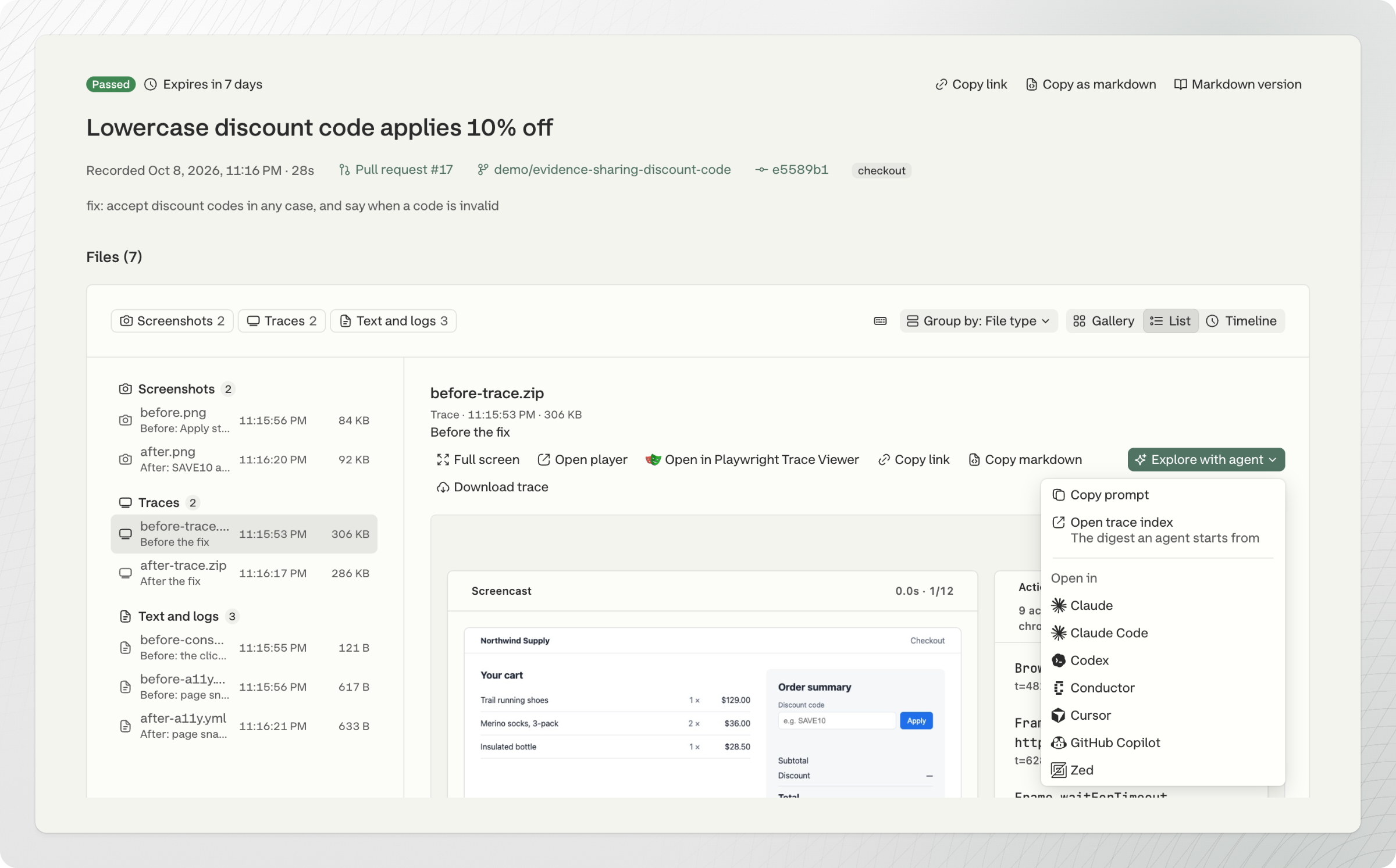
On a session page, **Explore with agent** on a trace copies a prompt with the trace API link, opens the trace summary, or opens the prompt in your coding tool:

<figure><img src="https://3745692499-files.gitbook.io/~/files/v0/b/gitbook-x-prod.appspot.com/o/spaces%2FqmFDEiUa9mr11LUlxDnt%2Fuploads%2Fgit-blob-fba1170289bea84e52633168f26adb1eef7d33f5%2Fsession-explore-with-agent.png?alt=media" alt="A trace on a session page with the Explore with agent menu open: Copy prompt, Open trace index, and Open in Claude, Claude Code, Codex, Conductor, Cursor, GitHub Copilot or Zed"><figcaption><p>Explore with agent on a trace in a session</p></figcaption></figure>

## Ask the agent

Paste the Fix link of a failed test, then:

```
Read the trace of the failed attempt: the summary first, then the page at the
failure. Tell me what the page showed when the test failed, before you change
the code.
```

For a session where an API response looks wrong:

```
Open the trace API link in this session. Find the request whose body contains
ApplyDiscount, and compare its response with the total the page shows.
```

To show the failure to people:

```
Get a trace API link for the failed attempt. Add its filmstrip up to the failure
and the frame at the failure to the pull request comment.
```

## Example: a checkout that freezes

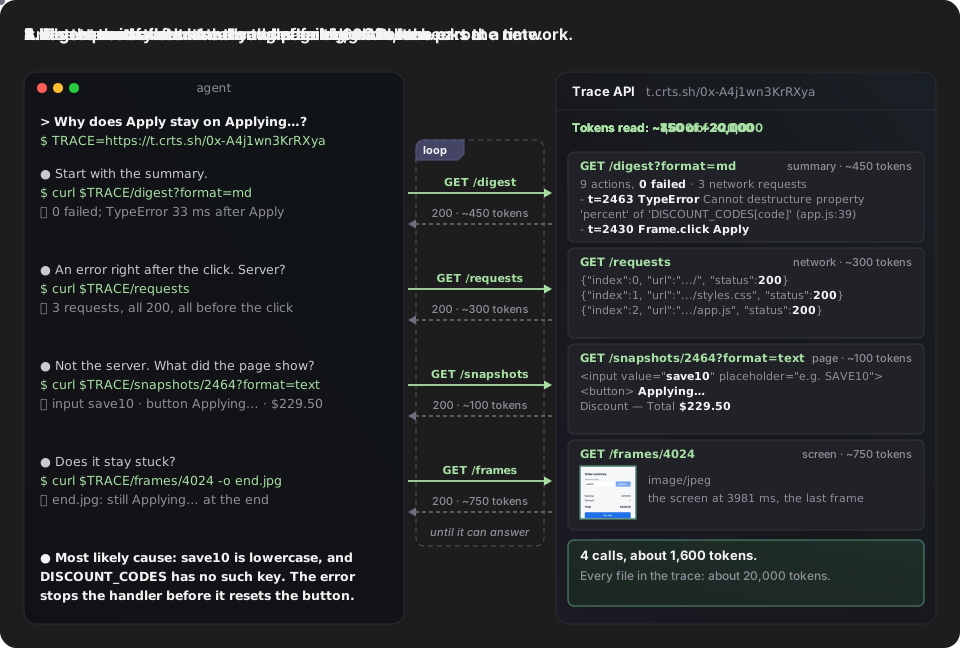
A session recorded a checkout where the discount code `save10` leaves the **Apply** button stuck. The agent got the trace API link from the session page with **Explore with agent**. Times are milliseconds from the start of the trace.

1. The summary, `/digest`, lists the actions. No action failed, but the page threw a `TypeError` 33 ms after the click on **Apply**. About 450 tokens.
2. The network requests, `/requests`: all 3 returned 200 before the click, so the server is not the cause. About 300 tokens.
3. The page text right after the error, `/snapshots/2464?format=text`: the input holds `save10` in lowercase, the button reads `Applying…`, and the total is still `$229.50`. About 100 tokens.
4. The screen at the end, `/frames/4024`: the button is still stuck. An image of about 750 tokens.

The agent used about 1,600 tokens. Every file in the trace together is about 20,000 tokens.

## What the agent reads

The agent asks the trace API for one part at a time: the summary, the page text, the accessibility tree, the HTML, the network requests and their bodies, or the files in the trace. [Trace API](/ai/reference/trace-api.md) lists each route, with real output from a failed test.

An agent in a terminal does this with `curl`. It reads each answer and picks the next call from it, until it can answer. Here it reads the trace of the checkout example above:

<figure><img src="https://3745692499-files.gitbook.io/~/files/v0/b/gitbook-x-prod.appspot.com/o/spaces%2FqmFDEiUa9mr11LUlxDnt%2Fuploads%2Fgit-blob-3c2bb39ad6f38fbc4506ab85aecc04dd0ddf0fcd%2Ftrace-api-calls.svg?alt=media" alt="Animation. A terminal agent and the trace API exchange four calls in a loop. The agent asks for /digest and learns no action failed and a TypeError came 33 ms after the click on Apply. It asks for /requests and learns all 3 requests returned 200 before the click. It asks for /snapshots/2464 and sees the input holds lowercase save10, the button reads Applying… and the total is $229.50. It asks for /frames/4024 and gets an image of the button still stuck. It answers that save10 is not a key in DISCOUNT_CODES and the error stops the handler before it resets the button. It used about 1,600 tokens, of about 20,000 for the whole trace."><figcaption><p>An agent finds the cause of the stuck checkout in four calls to the trace API</p></figcaption></figure>

## Available formats

The trace API returns each part of the trace in more than one format: Markdown and JSON for agents, images and pages for people. Below are three you are likely to post in a pull request or an issue. Add the path in each example to the trace API link to get the same output.

[Trace API](/ai/reference/trace-api.md) lists every route and option, with real output for each: the summary, the screen at any time, the page as text, accessibility tree or HTML, network requests and their bodies, the files in the trace, and the trace zip.

### Filmstrip

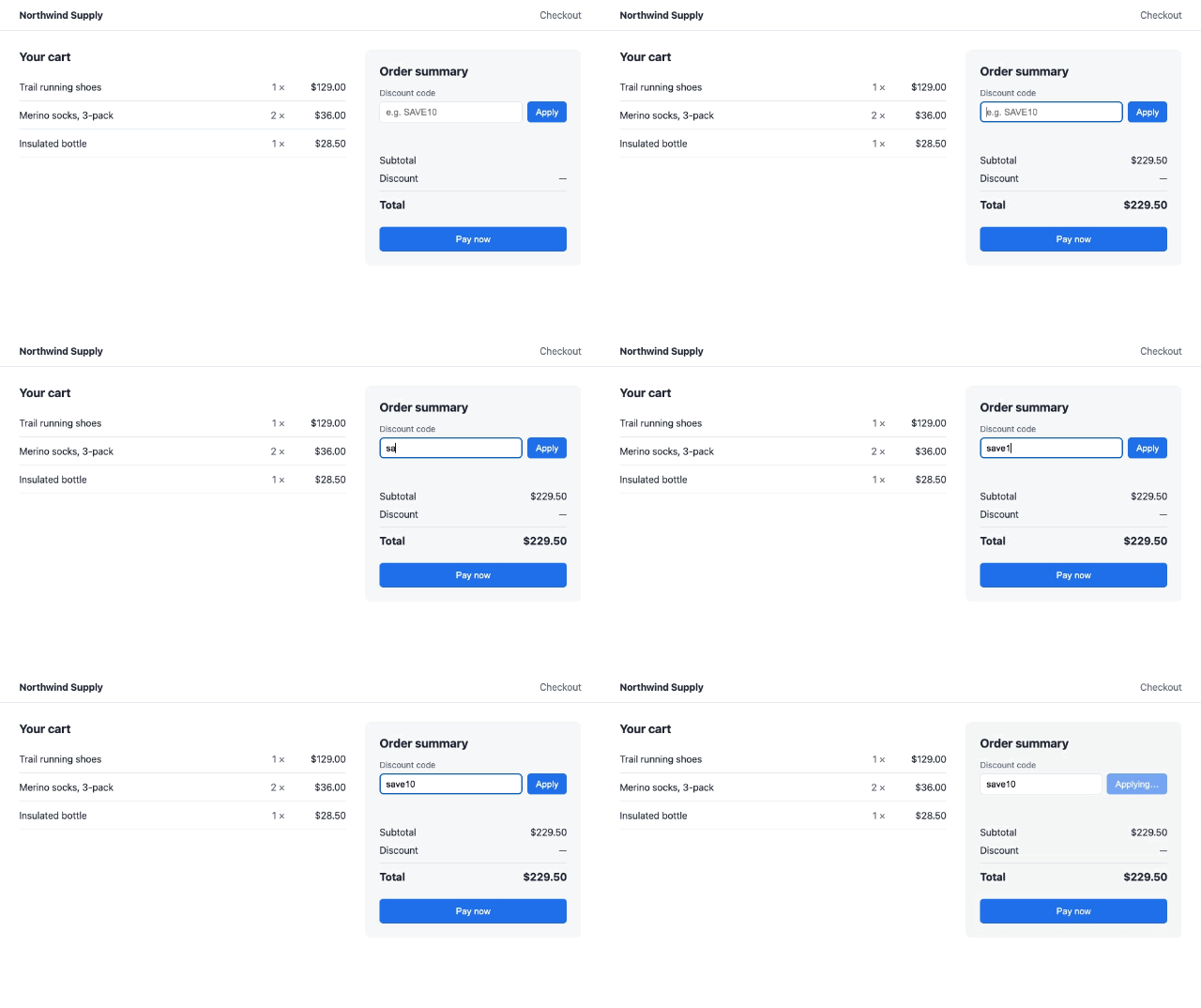
`/filmstrip?end=failure&layout=row&width=480` returns the frames up to the failure in one WebP image, and outlines the last one in red. That is the frame `/frames/failure` returns: the last frame before the failure, which can be seconds earlier while an assertion waits. From a failed test that expected a total of `$206.55` and got `$183.60`:

<figure><img src="https://3745692499-files.gitbook.io/~/files/v0/b/gitbook-x-prod.appspot.com/o/spaces%2FqmFDEiUa9mr11LUlxDnt%2Fuploads%2Fgit-blob-1c054fd9bca5de62102d44868e3e3384c0e3cb6d%2Ftrace-filmstrip-failure-row.png?alt=media" alt="Three frames of the checkout in one row: save10 typed into the discount field with a total of $229.50, then the same, then outlined in red: SAVE10 applied: 10% off, a discount of −$22.95 and a total of $183.60"><figcaption><p><code>/filmstrip?end=failure&#x26;layout=row&#x26;width=480</code>: the failed test up to the failure</p></figcaption></figure>

### The page at the failure

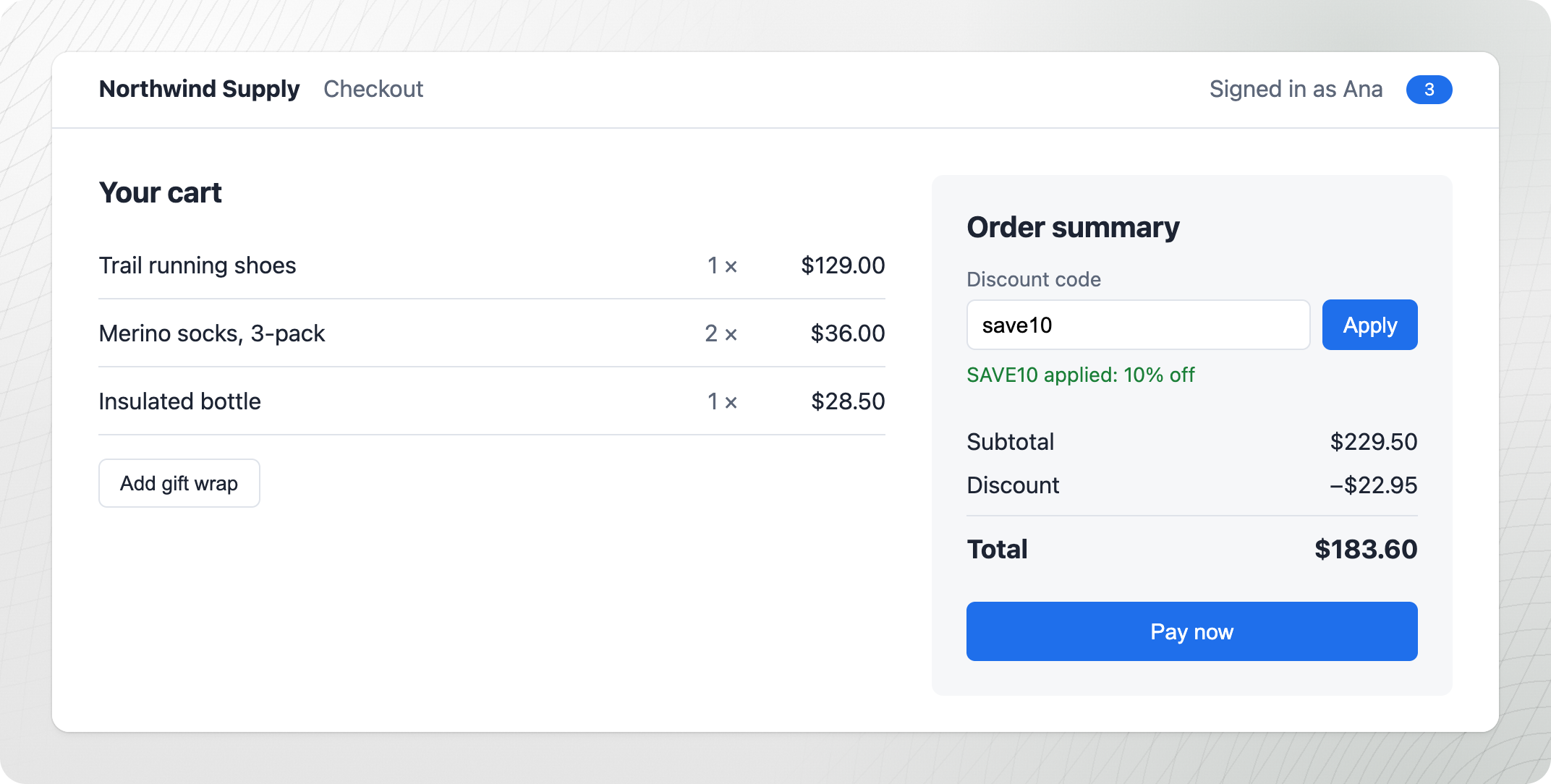
`/snapshots/failure?format=html` returns the page when the test failed, with the styles from the trace. The trace API removes the scripts, so buttons and links do nothing. The same failed test, opened in a browser:

<figure><img src="https://3745692499-files.gitbook.io/~/files/v0/b/gitbook-x-prod.appspot.com/o/spaces%2FqmFDEiUa9mr11LUlxDnt%2Fuploads%2Fgit-blob-740437e4360149b9cd165dedd62c84370446ebed%2Ftrace-snapshot-html.png?alt=media" alt="The checkout page rebuilt from the DOM snapshot at the failure: save10 in the discount field, SAVE10 applied: 10% off, a discount of −$22.95 and a total of $183.60"><figcaption><p><code>/snapshots/failure?format=html</code>: the page when the test failed, opened in a browser</p></figcaption></figure>

### Animation

`/animation?format=gif&width=640` returns the recording as a GIF, 640 pixels wide. A test that runs for a few seconds has only a few frames, so this one comes from the checkout session above:

<figure><img src="https://3745692499-files.gitbook.io/~/files/v0/b/gitbook-x-prod.appspot.com/o/spaces%2FqmFDEiUa9mr11LUlxDnt%2Fuploads%2Fgit-blob-1144f441700ad6ba0f2799407ca6525384af2836%2Ftrace-animation-checkout.gif?alt=media" alt="An animation of the checkout: save10 is typed into the discount field, Apply is clicked, and the button stays on Applying… while the total stays at $229.50" width="584"><figcaption><p><code>/animation?format=gif&#x26;width=640</code>: the checkout session as a GIF</p></figcaption></figure>

GitHub shows these images in Markdown. Linear and Slack do not. See [Post evidence to GitHub, Slack and Linear](/ai/agentic-artifacts/post-evidence.md).


---

# Agent Instructions
This documentation is published with GitBook. GitBook is the documentation platform designed so that both humans and AI agents can read, navigate, and reason over technical content effectively. Learn more at gitbook.com.

## Querying This Documentation
If you need additional information that is not directly available in this page, you can query the documentation by asking a question.

Perform an HTTP GET request on the following URL with the `ask` and `goal` query parameters:

```
GET https://docs.currents.dev/ai/agentic-artifacts/explore-a-trace.md?ask=<question>&goal=<user_goal>
```

`ask` is the immediate question: it should be specific, self-contained, and written in natural language.
`goal` is what the user is ultimately trying to achieve, the reason they need the answer. Sharing it helps GitBook give you a better, more relevant answer. A goal is most helpful when it describes the outcome the user wants rather than restating the question. For example, with `ask=how do I create an API token`, a goal like `automate deployments from our CI pipeline` lets GitBook tailor the answer to that use case.

The response will contain a direct answer to the question and relevant excerpts and sources from the documentation.

Use this mechanism when the answer is not explicitly present in the current page, you need clarification or additional context, or you want to retrieve related documentation sections.