> For the complete documentation index, see [llms.txt](https://docs.currents.dev/llms.txt). Markdown versions of documentation pages are available by appending `.md` to page URLs; this page is available as [Markdown](https://docs.currents.dev/ai/agent-evidence.md).
# Agent evidence
Record screenshots, video, a Playwright trace and logs of what your AI agent did, and share them as one link: proof for a pull request, a bug report or a task that is not a test
Use agent evidence when no test covers what the agent did. When a CI test covers it, the CI runs are the evidence: see [Agentic testing](/ai/agentic-testing.md).
When an AI agent says "fixed" or "done", you usually get a summary and maybe a screenshot in the chat. To check the work, you run the branch yourself. With agent evidence, the agent records what it did in the browser or on the machine, and saves it to Currents: screenshots, video, the Playwright trace, page snapshots and logs. You get one link to all of it. A reviewer opens the link without a Currents login, and another agent can read the same link as text. Anyone with the link can open it, so share it only where you would post a public gist; see [Share links](/ai/reference/share-links.md).
Currents keeps each recording as a session: a title, a passed or failed status, the commit, the pull request and the files. A session is not a test run, and it does not change your run lists, analytics or flakiness. The dashboard has no list of sessions: keep the link, or find sessions with the API. See [Sessions](/ai/reference/sessions.md).
## When to use it
| You want to | Read |
| ----------------------------------------------------------------------------------- | ------------------------------------------------------------------------------ |
| Show a bug, then show it fixed, on a pull request | [Record a bug and its fix](/ai/agent-evidence/bug-and-fix.md) |
| Keep the logs and files of a task that is not testing | [Record any agent task](/ai/agent-evidence/any-agent-task.md) |
| Record a browser driven with Playwright MCP | [Record with Playwright MCP](/ai/agent-evidence/bug-and-fix/playwright-mcp.md) |
| Record a browser driven with Playwright CLI | [Record with Playwright CLI](/ai/agent-evidence/bug-and-fix/playwright-cli.md) |
| Keep the results of a Playwright Test or Vitest run that did not report to Currents | [Record local test results](/ai/agent-evidence/local-test-results.md) |
| Record from an agent that cannot install the Currents CLI | [Record without the Currents CLI](/ai/agent-evidence/mcp-tools.md) |
## Install the Currents CLI and set a key
* The Currents CLI, `@currents/cmd` 2.0 or later, in the project: `npm install --save-dev @currents/cmd`. Without it, `npx currents` runs an unrelated npm package that is also named `currents`.
* A [record key](/guides/record-key.md) in `CURRENTS_RECORD_KEY`, such as the one your CI already uses, or a Read & Write [API key](/dashboard/administration/api-keys.md) in `CURRENTS_API_KEY`.
## Record your first session
Three commands create a session, add files to it and share it:
```bash
npx currents session start --project-id --title "Checkout total ignores coupons" --status failed
npx currents session attach before.png after.png
npx currents session share
```
`session attach` takes any files or folders. `session share` prints two links: a page for people and a Markdown version of the same page for agents. See [currents session](/resources/reporters/currents-cmd/currents-session.md) for all options.
To have an agent do it, give it a [skill](/ai/agent-skills.md) with the steps: an agent connected to the Currents MCP server has one, with nothing to install; an agent with only a shell needs `npx currents skill --install`.
## What people see
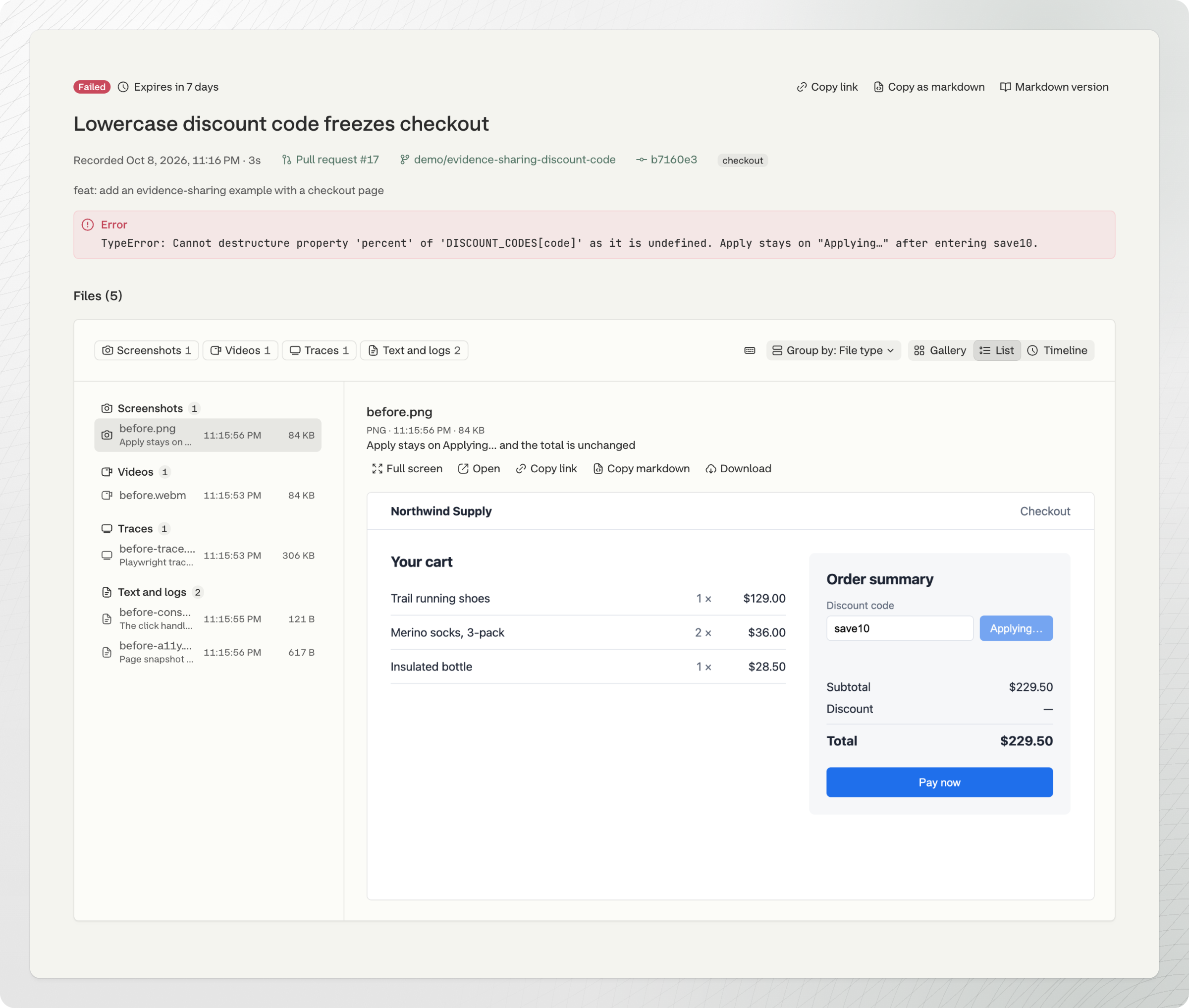
The page link opens the session: its title, status, error, tags, branch, commit and pull request, and its files. You can show the files as a gallery, a list, or a timeline in the order the agent recorded them.
You can open every file on the page:
* Screenshots and other images, side by side to compare before and after
* Videos, in a video player
* Playwright traces, in a trace player or in the Playwright Trace Viewer
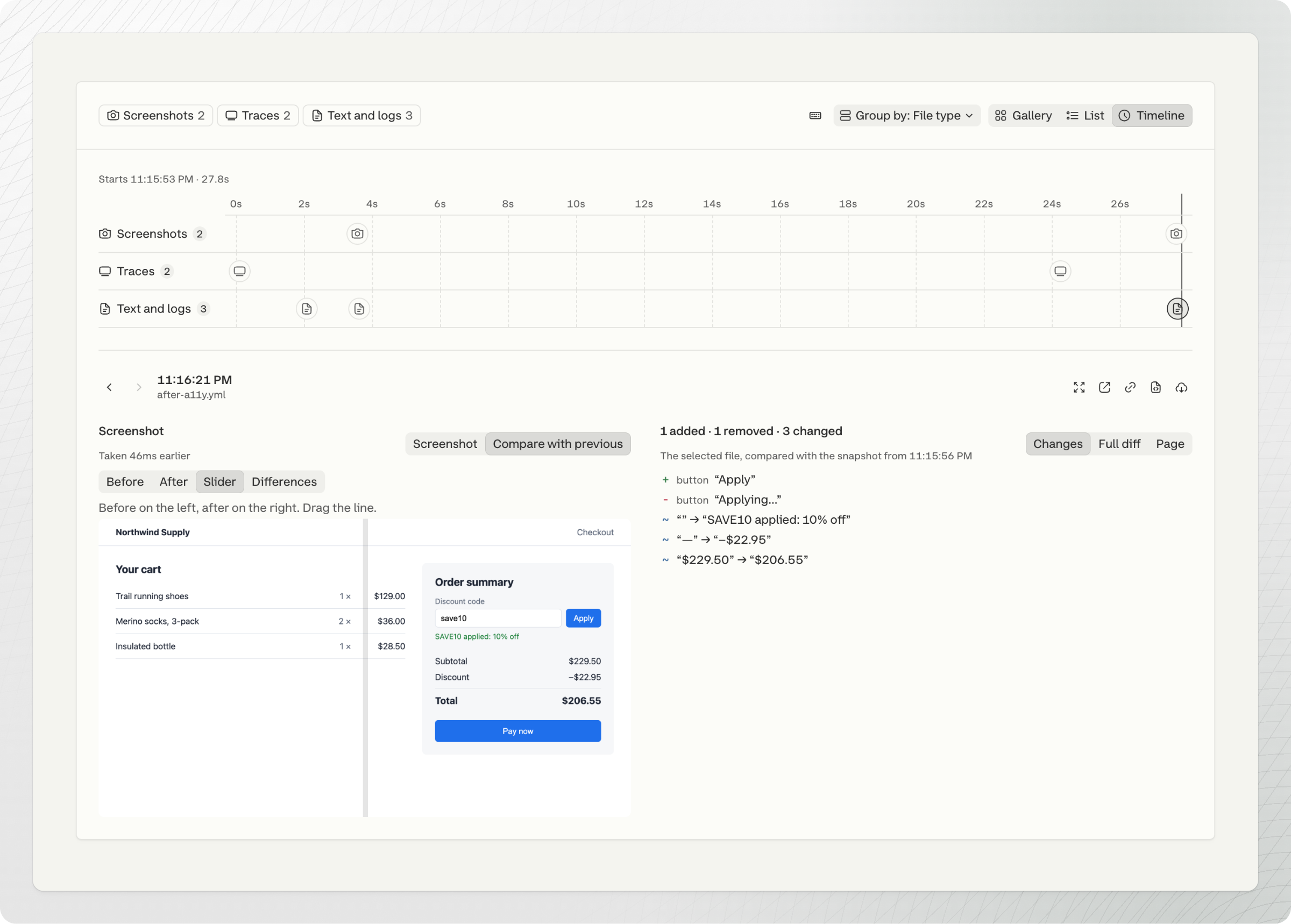
* Page snapshots, the `page-*.yml` files that Playwright MCP and Playwright CLI save. The page shows each one as an accessibility tree, with what changed since the snapshot before it.
* Console logs, HAR files, JSON, Markdown, CSV and other text files, up to 512 KB each
* Any other file, as a download
Select a page snapshot on the timeline to see what changed, next to the screenshot taken at the same time:
The page always shows the current session. Files attached after you shared it appear too.
## What agents see
The Markdown link is the page link with `.md` at the end. An agent reads it without a Currents login. It holds:
* The title, status, tags, error, branch, commit and pull request
* A link to each file, with its caption
* For the first trace: a short text summary with each action and its time, page errors and console errors
* The accessibility tree of the page at the end of that trace
Each trace has a link to the [trace API](/ai/agentic-artifacts/explore-a-trace.md). The agent uses it to read one part of the trace at a time, such as the page text at one moment or the network requests, instead of downloading the whole trace.
## Share one file
Each file in a session has its own link, which works for as long as the session link. On the session page, open a file and select Copy link, or Copy markdown for a Markdown line: an embedded image for a screenshot, a link for any other file. Post one file in a pull request, an issue or a chat without the rest of the session.
## Example: an agent finds a bug from a session
The session "Lowercase discount code freezes checkout" holds a trace, a video, a console log, a screenshot and a page snapshot. Give an agent its Markdown link:
```
Checkout froze in this recorded session: https://s.crts.sh/ai/.md
Read it, then use its trace API links to read the page text right after the
Apply click and the network requests. Tell me the cause in 5 short lines.
```
The agent reads the session's Markdown link, then uses the trace API to read the page text right after the click and the network requests. It finds that the click handler throws an error on the lowercase code, so the button never resets. [Explore a trace](/ai/agentic-artifacts/explore-a-trace.md) walks through the same trace step by step.
---
# Agent Instructions
This documentation is published with GitBook. GitBook is the documentation platform designed so that both humans and AI agents can read, navigate, and reason over technical content effectively. Learn more at gitbook.com.
## Querying This Documentation
If you need additional information that is not directly available in this page, you can query the documentation by asking a question.
Perform an HTTP GET request on the following URL with the `ask` and `goal` query parameters:
```
GET https://docs.currents.dev/ai/agent-evidence.md?ask=&goal=
```
`ask` is the immediate question: it should be specific, self-contained, and written in natural language.
`goal` is what the user is ultimately trying to achieve, the reason they need the answer. Sharing it helps GitBook give you a better, more relevant answer. A goal is most helpful when it describes the outcome the user wants rather than restating the question. For example, with `ask=how do I create an API token`, a goal like `automate deployments from our CI pipeline` lets GitBook tailor the answer to that use case.
The response will contain a direct answer to the question and relevant excerpts and sources from the documentation.
Use this mechanism when the answer is not explicitly present in the current page, you need clarification or additional context, or you want to retrieve related documentation sections.